Czy ktoś może zhakować mój telefon? Sygnały, ryzyka i co robić w 2026 roku
Czy ktoś może zhakować mój telefon? Tak, większość ofiar tego nie zauważa. Poznaj 7 ostrzegawczych sygnałów zhakowanego telefonu, jak atakujący wchodzą i dokładne kroki, by ich zablokować.
TL;DR
Tak, twój telefon może zostać zhakowany, najczęściej przez linki phishingowe, złośliwe aplikacje, publiczne Wi-Fi, ataki SIM-swap lub powtarzane hasła wyciekłe w naruszeniu danych. Sygnały ostrzegawcze to nagłe rozładowanie baterii, nieznane aplikacje, nieoczekiwane opłaty i kody 2FA, których nie zamawiałeś. Rozwiązanie to reakcja wielowarstwowa: zmień hasła kont z czystego urządzenia, włącz aplikację uwierzytelniającą, sprawdź zainstalowane aplikacje i skontaktuj się z operatorem, jeśli podejrzewasz SIM-swap.
Rzucasz okiem na telefon i zauważasz trzy SMS-y z kodami dwuetapowymi, o które nigdy nie prosiłeś. Twoja bateria, w pełni naładowana godzinę temu, jest na 41%. Aplikacja bankowa prosi cię o ponowne zalogowanie. Nic z tego nie jest przypadkiem. Ktoś testuje zamki twojego cyfrowego życia, a odpowiedź na pytanie "czy ktoś może zhakować mój telefon" jest niewygodna: tak, i większość ofiar nie zauważa tego, dopóki pieniądze już nie znikną.
Według raportu FTC Consumer Sentinel Network z 2024 roku, amerykańscy konsumenci stracili ponad 1,03 miliarda dolarów w wyniku oszustw i kradzieży tożsamości, które zaczęły się na urządzeniu mobilnym lub za jego pośrednictwem. Atakujący nie potrzebują fizycznego dostępu do twojego telefonu. Potrzebują jednej chwili nieuwagi, kliknięcia w link, zainstalowanej aplikacji, powtórzonego hasła, telefonu do operatora, a reszta staje się dźwignią.
Czy twój telefon naprawdę może zostać zhakowany?
Tak. Słowo "zhakowany" obejmuje szerokie spektrum, a zrozumienie, o który rodzaj chodzi, ma znaczenie, bo reakcja jest inna. Nowoczesny telefon z aktualnym systemem operacyjnym jest naprawdę trudny do złamania samym kodem, exploity systemowe istnieją, ale są drogie, rzadkie i zarezerwowane dla celów o wysokiej wartości. Codzienny "hack", którego doświadcza większość ludzi, to nie zdalny exploit zero-day. To przejęcie konta, przejęcie karty SIM, oprogramowanie szpiegujące zainstalowane przez kogoś z krótkim fizycznym dostępem, albo złośliwa aplikacja, którą ofiara została oszukana, by zainstalować.
Według raportu FBI o przestępczości internetowej z 2024 roku, ataki wymierzone w urządzenia mobilne rosną z roku na rok od pięciu lat, a phishing i przejęcie konta to dominujące kategorie. Zagrożeniem nie jest to, że twój iPhone czy Android jest z natury niebezpieczny, lecz to, że człowieka siedzącego za nim można oszukać, a atakującemu wystarczy wygrać tylko raz.
Dobra wiadomość: ten sam czynnik ludzki, który umożliwia hakowanie, umożliwia też zapobieganie. Większość udanych ataków na telefony opiera się na tym, że ofiara wykonuje konkretną czynność: kliknięcie, instalację, wpisanie hasła. Rozpoznaj wzorzec, a atak się załamie.
Jak zhakować telefon w 2026 roku
Istnieje pięć ścieżek ataku, które odpowiadają za zdecydowaną większość włamań do telefonów w 2026 roku. Znajomość działania każdej z nich to podstawa obrony przed wszystkimi.
Linki phishingowe i smishingowe. SMS podaje się za wiadomość od twojego banku, operatora, firmy kurierskiej lub urzędu skarbowego. Link prowadzi do niemal idealnej kopii prawdziwej strony logowania. Wpisujesz swoje dane. Atakujący ma je już, wraz z każdym kodem 2FA, który mu przekażesz. Według raportu Proofpoint State of the Phish z 2024 roku, próby smishingu wzrosły o 318% rok do roku, a znaczący odsetek odbiorców nadal klika.
Złośliwe aplikacje. Aplikacje sideloadowane z nieoficjalnych sklepów, zmodyfikowane wersje popularnych gier, fałszywe narzędzia "aktualizacji systemu", a nawet sporadyczni oszuści, którym uda się prześlizgnąć przez recenzje oficjalnych sklepów, mogą przenosić oprogramowanie szpiegujące, stalkerware lub trojany bankowe. Po instalacji te aplikacje żądają szerokich uprawnień i po cichu zbierają dane logowania, zrzuty ekranu oraz treść SMS-ów.
Ataki SIM-swap. Atakujący kontaktuje się z twoim operatorem, podszywa się pod ciebie, wykorzystując dane osobowe zdobyte z wycieków danych i mediów społecznościowych, i przekonuje przedstawiciela operatora, by przeniósł twój numer telefonu na kartę SIM kontrolowaną przez atakującego. W ciągu kilku minut każdy kod 2FA oparty na SMS trafia do niego, nie do ciebie. Według FBI IC3, oszustwa SIM-swap spowodowały w 2024 roku ponad 48 milionów dolarów zgłoszonych strat w USA, a ta kategoria jest stale niedoszacowana, ponieważ wielu poszkodowanych początkowo obwinia operatora.
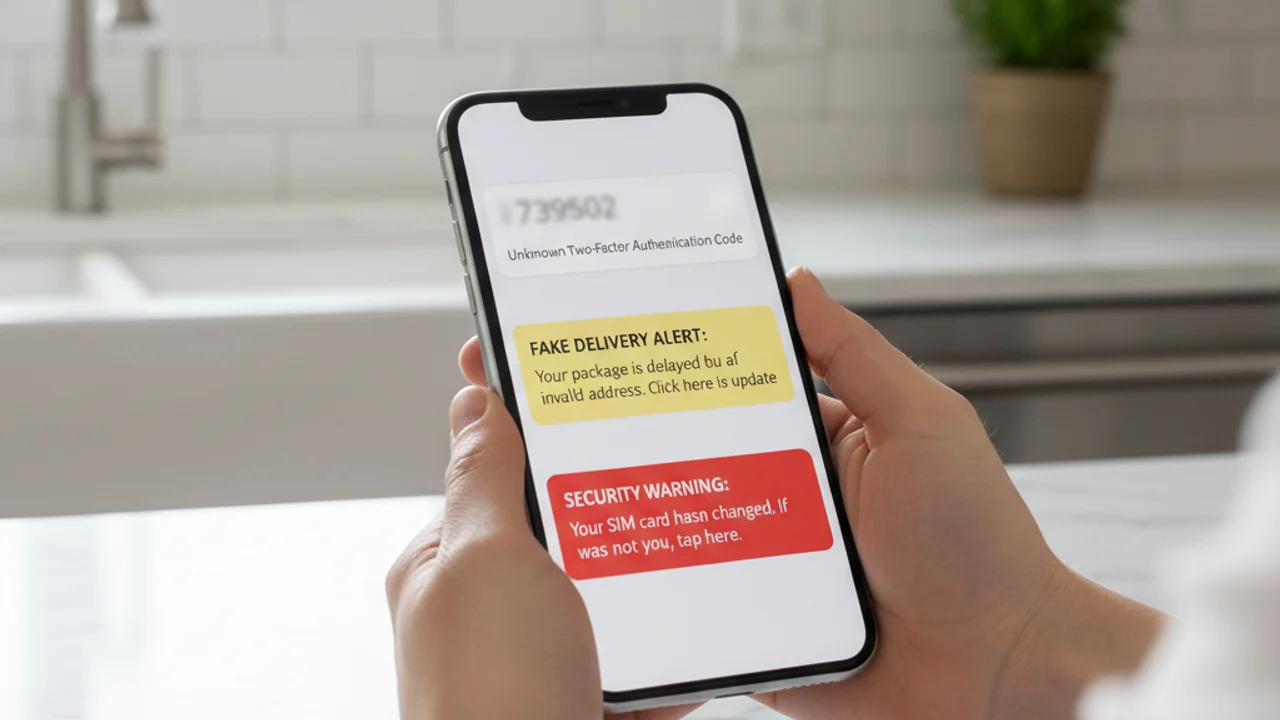
Ponowne użycie danych logowania z wycieków. Co roku miliardy kombinacji e-maili i haseł zostają ujawnione w wyciekach danych. Jeśli używasz tego samego hasła na wielu stronach, atakujący, który kupi wyciekłą bazę danych, może zalogować się na twoją pocztę, potem do kopii zapasowej w chmurze, potem na konto iCloud lub Google, a potem na twój telefon, wszystko bez dotknięcia urządzenia.
Publiczne Wi-Fi i fałszywe sieci. Fałszywy punkt dostępu w kawiarni, na lotnisku czy w hotelu może przechwytywać nieszyfrowany ruch, wstrzykiwać złośliwą zawartość na strony internetowe i zbierać tokeny sesji z zalogowanych aplikacji. Choć większość głównych aplikacji korzysta dziś z HTTPS i przypinania certyfikatów, zagrożenie utrzymuje się w przypadku starszych aplikacji, nieszyfrowanej poczty i stron phishingowych typu captive-portal.
7 sygnałów, że twój telefon został zhakowany
Pojedyncza anomalia rzadko wystarcza, by potwierdzić włamanie, telefony są "hałaśliwe", a wiele objawów ma niewinne wyjaśnienie. Ale dwa lub więcej z poniższych, pojawiające się razem w tym samym tygodniu, to silny sygnał:
Otrzymałeś podejrzany SMS, link lub film? Zeskanuj na truvizy.app zanim klikniesz.
Jak Truvizy pomaga wykryć atak zanim nastąpi
Najsilniejszą obroną przed zhakowaniem telefonu jest zatrzymanie ataku, zanim klikniesz link lub zainstalujesz aplikację. Wykrywanie oparte na AI od Truvizy zostało zbudowane właśnie na ten moment decyzji. Gdy przychodzi podejrzany SMS, alert o "dostawie paczki", powiadomienie o "bezpieczeństwie banku", film z celebrytą oferującym okazję inwestycyjną, wiadomość od rekrutera z ofertą zbyt dobrej pracy, możesz wkleić link lub przesłać film do Truvizy na truvizy.app i otrzymać werdykt w kilka sekund.
Wielowarstwowa analiza Truvizy identyfikuje wzorce typowe dla mobilnych kampanii phishingowych: sfałszowane domeny logowania, treści generowane przez AI używane do budowania fałszywej wiarygodności, powtarzalne szablony phishingowe i sfałszowane zrzuty ekranu aplikacji. Truvizy oznaczyło aktywne filmy rekrutacyjne SIM-swap, fałszywe portale bankowe i kody QR wyłudzające dane logowania w wielu kampaniach. Przepuszczaj przez Truvizy każdy link, obraz lub film, co do którego masz wątpliwości, zanim zaczniesz działać. Werdykt wraca szybciej, niż atakujący zdąży zareagować.
Co robić, gdy telefon został zhakowany
Jeśli podejrzewasz włamanie, kolejność działań ma znaczenie. Wykonaj te kroki z czystego urządzenia, laptopa, tabletu lub zaufanego telefonu członka rodziny, a nie z podejrzanego telefonu:
1. Najpierw zmień hasło głównego e-maila. Twój e-mail to ścieżka odzyskiwania niemal każdego innego konta. Jeśli ma go atakujący, każda inna próba resetu jest zagrożona. Użyj menedżera haseł, by wygenerować długie, unikalne hasło zastępcze.
2. Przełącz się z 2FA przez SMS na aplikację uwierzytelniającą. Kody SMS mogą zostać przechwycone przez atakujących SIM-swap oraz przez oprogramowanie szpiegujące na zainfekowanym telefonie. Używaj Google Authenticator, Authy lub sprzętowego klucza bezpieczeństwa dla każdego konta, które to obsługuje. Według wytycznych CISA dotyczących uwierzytelniania wieloskładnikowego , MFA oparte na aplikacji lub sprzęcie jest drastycznie bardziej odporne na phishing niż SMS.
3. Zadzwoń do operatora i poproś o PIN do przenoszenia numeru. To osobny sekretny kod wymagany, zanim twój numer będzie mógł zostać przeniesiony na nową kartę SIM. Każdy większy amerykański operator (Verizon, AT&T, T-Mobile) oferuje to obecnie. Jeśli podejrzewasz, że SIM-swap już trwa, poproś operatora o natychmiastowe zablokowanie linii.
4. Sprawdź zainstalowane aplikacje. Zarówno na iOS, jak i na Androidzie przejrzyj każdą zainstalowaną aplikację i odinstaluj wszystko, czego nie rozpoznajesz. Zwróć szczególną uwagę na aplikacje z uprawnieniami dostępności, administratora urządzenia lub nasłuchu powiadomień, to uprawnienia, których potrzebuje stalkerware, by działać.
5. Zaktualizuj system operacyjny. Zainstaluj najnowszą aktualizację systemu natychmiast. Wiele exploitów telefonów używanych w realnych atakach zostało już załatanych, ofiary są łamane, bo nie zaktualizowały systemu.
6. Zgłoś kradzież tożsamości i sprawdź swoją zdolność kredytową. Jeśli naruszono konta finansowe, złóż zgłoszenie na identitytheft.gov , oficjalny portal FTC generuje spersonalizowany plan odzyskiwania i może ustawić alert o oszustwie na twoim raporcie kredytowym. Zgłoś cyberprzestępstwo do FBI na ic3.gov .
7. Przywrócenie ustawień fabrycznych jako ostateczność. Jeśli nieznane aplikacje pojawiają się ponownie po usunięciu, albo telefon zachowuje się nieprzewidywalnie mimo powyższych kroków, pełne przywrócenie ustawień fabrycznych, a następnie ponowna instalacja aplikacji z oficjalnego sklepu po kolei, to najpewniejszy sposób na usunięcie trwałego złośliwego oprogramowania.
Key Takeaways
- Większość włamań do telefonów w 2026 to nie egzotyczne exploity, to kliknięcia phishingowe, aplikacje sideload, SIM-swap i powtarzane hasła. Rozpoznanie wzorca zatrzymuje atak.
- Obserwuj dwa lub więcej sygnałów razem: niezamówione kody 2FA, nieznane aplikacje, nagłe rozładowanie baterii, utrata sygnału komórkowego lub nieoczekiwana aktywność konta.
- Trwający SIM-swap objawia się utratą sygnału komórkowego przy działającym Wi-Fi, zadzwoń do operatora z innej linii natychmiast.
- Zawsze przepuszczaj podejrzane linki, obrazy i filmy przez Truvizy na truvizy.app przed kliknięciem, instalacją lub odpowiedzią.
Uwaga eksperta: Ataki mobilne w 2026 roku coraz częściej łączą się w łańcuchy: SMS phishingowy prowadzi do wyłudzenia danych logowania, co umożliwia SIM-swap, co po kolei odblokowuje każde konto chronione przez SMS. Obrona przed jednym dowolnym ogniwem tego łańcucha przerywa cały atak. Najskuteczniejszym ruchem, jaki może dziś wykonać każdy właściciel telefonu, jest przeniesienie 2FA z SMS na aplikację uwierzytelniającą lub klucz sprzętowy, w połączeniu z użyciem wykrywania AI od Truvizy do weryfikacji podejrzanych treści przed podjęciem działania.
Otrzymujesz trzy SMS-y w dziesięć minut z kodami 2FA do kont, do których nie próbowałeś się zalogować. Następnie telefon traci wszystkie sygnały komórkowe, podczas gdy Wi-Fi pozostaje połączone. Jaka jest poprawna reakcja?
- Poczekać godzinę, czy sygnał wróci, może to problem z masztem
- Odpowiedzieć na SMS-y pytając od kogo są
- Potraktować jako aktywny atak SIM-swap: z innego urządzenia zadzwonić do operatora, by zablokować linię i zmienić hasło e-maila
- Zrestartować telefon, by wyczyścić problem
Answer: Wiele niezamówionych kodów 2FA plus nagła utrata sygnału komórkowego to klasyczny wzorzec ataku SIM-swap. Każda minuta jest ważna. Użyj innego urządzenia, by zadzwonić do operatora, zablokuj linię i zmień hasła zaczynając od głównego e-maila.
Reakcja na wyciek danych: co robić, gdy twoje informacje zostały ujawnione — Wycieki poświadczeń umożliwiające włamania do telefonów, i jak zablokować konta zanim atakujący zadziałają
Smishing: jak działa phishing SMS i jak go zatrzymać — SMS-y, którymi zaczyna się większość włamań do telefonów, jak wyglądają i jak je rozpoznać
Skradziono moją tożsamość, co teraz? — Pełna mapa odzyskiwania dla ofiar kradzieży tożsamości, w tym zamrożenia kredytu i oficjalne zgłoszenia
FAQ
Czy ktoś może zhakować mój telefon znając tylko mój numer?
Sam numer nie wystarczy, by przejąć nowoczesnego smartfona, ale wystarcza, by uruchomić ataki prowadzące do przejęcia: phishingowe SMS-y, żądania SIM-swap u operatora, sfałszowane połączenia weryfikacyjne oraz ukierunkowane procesy odzyskiwania konta. Według raportu FBI IC3 2024 oszustwa SIM-swap kosztowały amerykańskie ofiary ponad 48 milionów dolarów zgłoszonych strat, a większość ataków zaczyna się od numeru telefonu.
Jakie są najczęstsze sygnały zhakowanego telefonu?
Najwiarygodniejsze sygnały: niezamówione kody 2FA, e-maile resetujące hasło do nietkniętych kont, nieznane aplikacje, nagłe rozładowanie baterii lub przegrzanie w spoczynku, skoki transferu danych mobilnych, operator pokazuje twoją linię na nieznanej karcie SIM, znajomi otrzymują od ciebie wiadomości, których nie wysyłałeś.
Jak hakerzy faktycznie wchodzą do telefonu w 2026?
W 2026 cztery główne ścieżki: linki phishingowe przez SMS lub komunikatory (smishing), złośliwe aplikacje sideloadowane poza oficjalnymi sklepami, przejęcie konta przez powtarzane wyciekłe poświadczenia oraz ataki SIM-swap przejmujące numer u operatora. Według Verizon 2024 DBIR czynnik ludzki był zaangażowany w 68% naruszeń.
Czy Truvizy może pomóc sprawdzić, czy podejrzany link lub film jest częścią oszustwa hakerskiego?
Tak. Analiza AI Truvizy na truvizy.app skanuje podejrzane linki, filmy i obrazy pod kątem wzorców mobilnych kampanii phishingowych. W Polsce CERT Polska (cert.pl) oraz CSIRT NASK są oficjalnymi punktami zgłaszania incydentów cybernetycznych.
Co zrobić w pierwszej kolejności, jeśli sądzę, że telefon został zhakowany?
Przejdź na czyste urządzenie, zaufany laptop lub telefon członka rodziny. Tam najpierw zmień hasło głównego e-maila, potem banku, potem każdego konta używającego twojego numeru do odzyskiwania. Włącz aplikację uwierzytelniającą zamiast SMS dla 2FA. Zadzwoń do operatora, by zablokował SIM i poprosić o PIN port-out. Następnie sprawdź aplikacje zainstalowane na podejrzanym telefonie i uruchom skan antywirusowy od zaufanego dostawcy.