มีคนแฮกโทรศัพท์ของฉันได้ไหม? สัญญาณ ความเสี่ยง และสิ่งที่ต้องทำในปี 2026
มีคนแฮกโทรศัพท์ของฉันได้ไหม? ใช่, และเหยื่อส่วนใหญ่ไม่รู้ตัว เรียนรู้สัญญาณเตือน 7 ประการของโทรศัพท์ที่ถูกแฮก ผู้โจมตีเข้าได้อย่างไร และขั้นตอนที่แม่นยำเพื่อกีดกันพวกเขา
TL;DR
ใช่ โทรศัพท์ของคุณสามารถถูกแฮกได้, ส่วนใหญ่ผ่านลิงก์ฟิชชิ่ง แอปอันตราย Wi-Fi สาธารณะ การโจมตี SIM-swap หรือรหัสผ่านที่ใช้ซ้ำซึ่งรั่วไหลในการละเมิดข้อมูล สัญญาณเตือนรวมถึงแบตเตอรี่หมดอย่างกะทันหัน แอปที่ไม่คุ้นเคย ค่าใช้จ่ายที่ไม่คาดคิด และรหัส 2FA ที่คุณไม่ได้ร้องขอ
คุณเหลือบมองโทรศัพท์และสังเกตเห็นข้อความสามฉบับที่มีรหัสยืนยันสองขั้นตอนซึ่งคุณไม่เคยขอ แบตเตอรี่ที่เพิ่งชาร์จเต็มเมื่อชั่วโมงก่อนตอนนี้เหลือ 41% แอปธนาคารกำลังขอให้คุณเข้าสู่ระบบอีกครั้ง ไม่มีสิ่งใดในนี้ที่เป็นเรื่องบังเอิญ มีใครบางคนกำลังทดสอบกุญแจของชีวิตดิจิทัลคุณอยู่ และคำตอบของคำถาม มีคนแฮกโทรศัพท์ของฉันได้ไหม นั้นไม่สบายใจ: ได้ และเหยื่อส่วนใหญ่ไม่รู้ตัวจนกระทั่งเงินหายไปแล้ว
ตามรายงาน Consumer Sentinel Network ปี 2024 ของ FTC ผู้บริโภคในสหรัฐสูญเสียเงินกว่า 1.03 พันล้านดอลลาร์จากการฉ้อโกงและการขโมยอัตลักษณ์ที่เริ่มต้นบนหรือผ่านอุปกรณ์มือถือ ผู้โจมตีไม่จำเป็นต้องเข้าถึงโทรศัพท์ของคุณทางกายภาพ พวกเขาต้องการเพียงช่วงเวลาแห่งความประมาทเพียงครั้งเดียว: ลิงก์ที่ถูกแตะ แอปที่ถูกติดตั้ง รหัสผ่านที่ใช้ซ้ำ การโทรหาผู้ให้บริการของคุณ ส่วนที่เหลือคือความได้เปรียบของพวกเขา
โทรศัพท์ของคุณถูกแฮกได้จริงหรือ?
ใช่ คำว่า ถูกแฮก ครอบคลุมความหมายที่หลากหลาย และการเข้าใจว่าเป็นประเภทใดสำคัญมาก เพราะการตอบสนองนั้นแตกต่างกัน โทรศัพท์สมัยใหม่ที่ใช้ระบบปฏิบัติการล่าสุดนั้นยากจริง ๆ ที่จะถูกเจาะผ่านโค้ดเพียงอย่างเดียว ช่องโหว่ของระบบปฏิบัติการมีอยู่จริง แต่มีราคาแพง หายาก และสงวนไว้สำหรับเป้าหมายที่มีมูลค่าสูง การ แฮก ในชีวิตประจำวันที่คนส่วนใหญ่เจอไม่ใช่การโจมตีแบบซีโรเดย์จากระยะไกล แต่คือการยึดบัญชี การขโมย SIM สปายแวร์ที่ติดตั้งโดยผู้ที่มีสิทธิ์เข้าถึงทางกายภาพในช่วงสั้น ๆ หรือแอปอันตรายที่เหยื่อถูกหลอกให้ติดตั้ง
ตามรายงานอาชญากรรมทางอินเทอร์เน็ตปี 2024 ของ FBI การโจมตีที่มุ่งเป้าไปที่มือถือเพิ่มขึ้นทุกปีในช่วงห้าปีที่ผ่านมา โดยฟิชชิ่งและการยึดบัญชีเป็นประเภทหลัก ภัยคุกคามไม่ได้อยู่ที่ iPhone หรือ Android ของคุณไม่ปลอดภัยโดยพื้นฐาน แต่อยู่ที่มนุษย์ที่ใช้งานมันสามารถถูกหลอกได้ และผู้โจมตีต้องการแค่ชนะเพียงครั้งเดียว
ข่าวดีคือ ปัจจัยมนุษย์เดียวกันที่ทำให้การแฮกเป็นไปได้ก็ทำให้การป้องกันเป็นไปได้เช่นกัน การโจมตีโทรศัพท์ที่สำเร็จส่วนใหญ่อาศัยการที่เหยื่อทำการกระทำเฉพาะอย่าง: การแตะ การติดตั้ง การป้อนรหัสผ่าน จดจำรูปแบบแล้วการโจมตีจะล้มเหลว
วิธีที่มีคนแฮกโทรศัพท์ในปี 2026
มีห้าเส้นทางการโจมตีที่คิดเป็นส่วนใหญ่ของการถูกบุกรุกโทรศัพท์ในปี 2026 การรู้ว่าแต่ละเส้นทางทำงานอย่างไรคือรากฐานของการป้องกันทั้งหมด
ลิงก์ฟิชชิ่งและสมิชชิ่ง ข้อความอ้างว่ามาจากธนาคาร ผู้ให้บริการ บริษัทขนส่ง หรือหน่วยงานภาษีของคุณ ลิงก์นำไปสู่หน้าเข้าสู่ระบบปลอมที่เหมือนของจริงเกือบทุกประการ คุณป้อนข้อมูลรับรอง ผู้โจมตีได้มันไปแล้ว บวกกับรหัส 2FA ใด ๆ ที่คุณส่งต่อ ตามรายงาน State of the Phish ปี 2024 ของ Proofpoint ความพยายามสมิชชิ่งเพิ่มขึ้น 318% เมื่อเทียบปีต่อปี และผู้รับส่วนใหญ่ยังคงแตะลิงก์
แอปอันตราย แอปที่ติดตั้งนอกสโตร์ทางการ เวอร์ชันดัดแปลงของเกมยอดนิยม เครื่องมือ อัปเดตระบบ ปลอม และแม้แต่นักพัฒนาที่ไม่ดีบางรายที่หลุดผ่านการตรวจสอบของสโตร์ทางการ ล้วนอาจมีสปายแวร์ สตอล์กเกอร์แวร์ หรือโทรจันธนาคารแฝงอยู่ เมื่อติดตั้งแล้ว แอปเหล่านี้จะขอสิทธิ์กว้างขวางและเก็บข้อมูลรับรอง ภาพหน้าจอ และเนื้อหา SMS อย่างเงียบ ๆ
การโจมตี SIM-swap ผู้โจมตีติดต่อผู้ให้บริการมือถือของคุณ ปลอมตัวเป็นคุณโดยใช้ข้อมูลส่วนบุคคลที่รวบรวมจากการรั่วไหลของข้อมูลและโซเชียลมีเดีย และโน้มน้าวตัวแทนผู้ให้บริการให้โอนหมายเลขโทรศัพท์ของคุณไปยัง SIM ที่ผู้โจมตีควบคุม ภายในไม่กี่นาที รหัส 2FA ที่ใช้ SMS ทั้งหมดจะส่งไปหาพวกเขา ไม่ใช่คุณ ตาม FBI IC3 การฉ้อโกง SIM-swap ทำให้เกิดความเสียหายที่รายงานในสหรัฐกว่า 48 ล้านดอลลาร์ในปี 2024 และหมวดหมู่นี้มักถูกรายงานต่ำกว่าความเป็นจริงเพราะเหยื่อจำนวนมากมักโทษผู้ให้บริการในตอนแรก
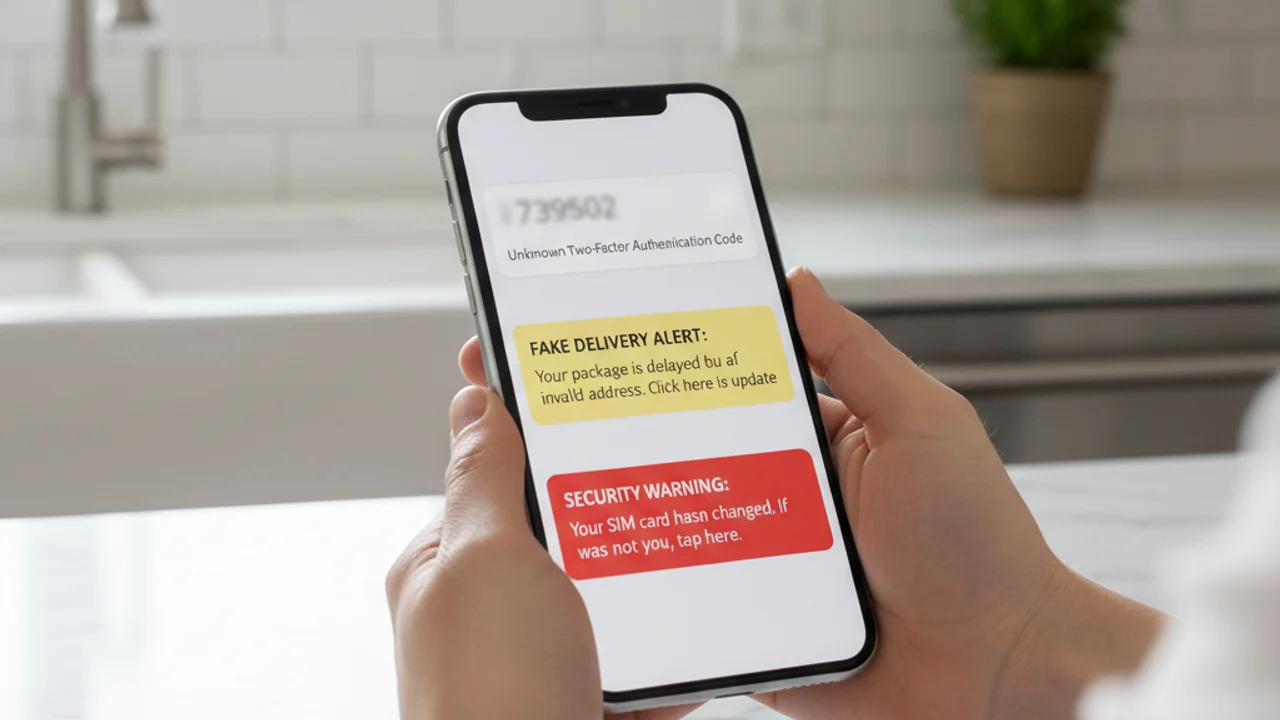
การใช้ข้อมูลรับรองซ้ำจากการรั่วไหลของข้อมูล ทุกปีมีการรวมกันของอีเมลและรหัสผ่านนับพันล้านรายการถูกเปิดเผยในการรั่วไหลของข้อมูล หากคุณใช้รหัสผ่านเดียวกันซ้ำในหลายเว็บไซต์ ผู้โจมตีที่ซื้อฐานข้อมูลที่รั่วไหลสามารถเข้าสู่ระบบอีเมลของคุณ จากนั้นแบ็กอัปคลาวด์ จากนั้นบัญชี iCloud หรือ Google จากนั้นโทรศัพท์ของคุณ ทั้งหมดนี้โดยไม่เคยแตะต้องอุปกรณ์เลย
Wi-Fi สาธารณะและเครือข่ายปลอม จุดเข้าถึงปลอมในร้านกาแฟ สนามบิน หรือโรงแรมสามารถดักจับทราฟฟิกที่ไม่เข้ารหัส แทรกเนื้อหาอันตรายลงในหน้าเว็บ และเก็บโทเคนเซสชันจากแอปที่ล็อกอินอยู่ แม้ว่าแอปหลักส่วนใหญ่ตอนนี้จะใช้ HTTPS และการปักหมุดใบรับรอง แต่ภัยคุกคามยังคงมีอยู่สำหรับแอปรุ่นเก่า อีเมลที่ไม่เข้ารหัส และหน้าฟิชชิ่งแบบ captive-portal
7 สัญญาณว่าโทรศัพท์ของคุณถูกแฮก
ความผิดปกติเพียงอย่างเดียวมักไม่เพียงพอที่จะยืนยันการถูกบุกรุก โทรศัพท์มีสัญญาณรบกวนมากและอาการหลายอย่างมีคำอธิบายที่ไม่เป็นอันตราย แต่หากสองอย่างขึ้นไปต่อไปนี้ปรากฏพร้อมกันภายในสัปดาห์เดียวกัน นั่นคือสัญญาณที่ชัดเจน:
ได้รับ SMS ลิงก์ หรือวิดีโอที่น่าสงสัย? สแกนที่ truvizy.app ก่อนแตะ
Truvizy ช่วยตรวจจับการโจมตีก่อนเกิดขึ้นได้อย่างไร
การป้องกันที่แข็งแกร่งที่สุดต่อการแฮกโทรศัพท์คือการหยุดการโจมตีก่อนที่คุณจะแตะลิงก์หรือติดตั้งแอป การตรวจจับด้วย AI ของ Truvizy ถูกสร้างขึ้นมาเพื่อช่วงเวลาแห่งการตัดสินใจนี้โดยเฉพาะ เมื่อข้อความที่น่าสงสัยมาถึง การแจ้งเตือน การจัดส่งพัสดุ การแจ้งเตือน ความปลอดภัยธนาคาร วิดีโอของคนดังที่เสนอโอกาสการลงทุน ข้อความจากนายหน้าที่เสนองานที่ดีเกินจริง คุณสามารถวางลิงก์หรืออัปโหลดวิดีโอไปยัง Truvizy ที่ truvizy.app และรับผลลัพธ์ภายในไม่กี่วินาที
การวิเคราะห์หลายชั้นของ Truvizy ระบุรูปแบบที่พบได้ทั่วไปในแคมเปญฟิชชิ่งบนมือถือ: โดเมนล็อกอินปลอม เนื้อหาที่สร้างโดย AI เพื่อสร้างความน่าเชื่อถือปลอม เทมเพลตฟิชชิ่งที่นำกลับมาใช้ซ้ำ และภาพหน้าจอแอปที่หลอกลวง Truvizy ได้ตรวจพบวิดีโอชักชวนเข้าร่วม SIM-swap ที่ยังทำงานอยู่ พอร์ทัลธนาคารปลอม และ QR โค้ดที่เก็บข้อมูลรับรองในหลายแคมเปญ ตรวจสอบลิงก์ ภาพ หรือวิดีโอใด ๆ ที่คุณไม่แน่ใจผ่าน Truvizy ก่อนที่จะดำเนินการ ผลลัพธ์กลับมาเร็วกว่าที่ผู้โจมตีจะตอบสนองได้
สิ่งที่ต้องทำหากโทรศัพท์ของคุณถูกแฮก
หากคุณสงสัยว่าถูกบุกรุก ลำดับการดำเนินการสำคัญมาก ทำตามขั้นตอนเหล่านี้จากอุปกรณ์ที่สะอาด แล็ปท็อป แท็บเล็ต หรือโทรศัพท์ของสมาชิกในครอบครัวที่คุณไว้ใจ ไม่ใช่จากโทรศัพท์ที่ต้องสงสัยเอง:
1. เปลี่ยนรหัสผ่านอีเมลหลักก่อน อีเมลของคุณคือเส้นทางการกู้คืนสำหรับบัญชีอื่น ๆ เกือบทั้งหมด หากผู้โจมตีมีมัน ความพยายามรีเซ็ตอื่น ๆ ทั้งหมดจะถูกบุกรุก ใช้ตัวจัดการรหัสผ่านเพื่อสร้างรหัสผ่านใหม่ที่ยาวและไม่ซ้ำใคร
2. เปลี่ยนจาก SMS 2FA เป็นแอปยืนยันตัวตน รหัส SMS สามารถถูกดักจับโดยผู้โจมตี SIM-swap และสปายแวร์บนโทรศัพท์ที่ถูกบุกรุก ใช้ Google Authenticator, Authy หรือคีย์ความปลอดภัยฮาร์ดแวร์สำหรับบัญชีใด ๆ ที่รองรับ ตาม คำแนะนำการยืนยันตัวตนหลายปัจจัยของ CISA MFA ที่ใช้แอปหรือฮาร์ดแวร์มีความทนทานต่อฟิชชิ่งมากกว่า SMS อย่างมาก
3. โทรหาผู้ให้บริการและขอ PIN สำหรับ port-out นี่คือรหัสลับแยกต่างหากที่จำเป็นก่อนที่หมายเลขของคุณจะถูกย้ายไปยัง SIM ใหม่ ผู้ให้บริการรายใหญ่ในสหรัฐทุกราย (Verizon, AT&T, T-Mobile) ตอนนี้มีบริการนี้แล้ว หากคุณสงสัยว่า SIM-swap กำลังเกิดขึ้นอยู่ ให้ขอให้ผู้ให้บริการล็อกสายทันที
4. ตรวจสอบแอปที่ติดตั้ง ทั้งบน iOS และ Android ตรวจสอบทุกแอปที่ติดตั้งและถอนการติดตั้งสิ่งที่คุณไม่รู้จัก ให้ความสนใจเป็นพิเศษกับแอปที่มีสิทธิ์การเข้าถึง การจัดการอุปกรณ์ หรือการฟังการแจ้งเตือน เพราะนี่คือสิทธิ์ที่สตอล์กเกอร์แวร์ต้องการเพื่อทำงาน
5. อัปเดตระบบปฏิบัติการ ติดตั้งอัปเดต OS ล่าสุดทันที ช่องโหว่โทรศัพท์จำนวนมากที่ใช้ในการโจมตีจริงได้รับการแก้ไขแล้ว เหยื่อถูกบุกรุกเพราะพวกเขาไม่ได้อัปเดต
6. รายงานการขโมยอัตลักษณ์และตรวจสอบเครดิตของคุณ หากบัญชีการเงินถูกแตะต้อง ให้ยื่นรายงานที่ identitytheft.gov พอร์ทัลทางการของ FTC จะสร้างแผนการกู้คืนเฉพาะบุคคลและสามารถตั้งการแจ้งเตือนการฉ้อโกงบนเครดิตของคุณได้ รายงานอาชญากรรมไซเบอร์ต่อ FBI ที่ ic3.gov
7. รีเซ็ตเป็นค่าโรงงานเป็นทางเลือกสุดท้าย หากแอปที่ไม่คุ้นเคยปรากฏขึ้นอีกหลังจากลบ หรือหากโทรศัพท์ทำงานผิดปกติหลังจากขั้นตอนข้างต้น การรีเซ็ตเป็นค่าโรงงานอย่างสมบูรณ์แล้วติดตั้งแอปใหม่จากสโตร์ทางการทีละแอปคือวิธีที่น่าเชื่อถือที่สุดในการกำจัดมัลแวร์ที่ฝังตัวอยู่
Key Takeaways
- การแฮกโทรศัพท์ส่วนใหญ่ในปี 2026 ไม่ใช่ช่องโหว่แปลก, เป็นการแตะฟิชชิ่ง แอปไซด์โหลด SIM-swap และรหัสผ่านที่ใช้ซ้ำ การรู้จักรูปแบบจะหยุดการโจมตี
- สังเกตสัญญาณสองอย่างขึ้นไปร่วมกัน: รหัส 2FA ที่ไม่ได้ร้องขอ แอปที่ไม่คุ้นเคย แบตเตอรี่หมดอย่างกะทันหัน สัญญาณเซลลูลาร์หายไป หรือกิจกรรมบัญชีที่ไม่คาดคิด
- SIM-swap ที่กำลังดำเนินอยู่จะแสดงเป็นการสูญเสียสัญญาณเซลลูลาร์ในขณะที่ Wi-Fi ทำงาน, โทรหาผู้ให้บริการจากสายอื่นทันที
- ส่งลิงก์ รูปภาพ และวิดีโอที่น่าสงสัยผ่าน Truvizy ที่ truvizy.app เสมอก่อนแตะ ติดตั้ง หรือตอบ
บันทึกการวิเคราะห์จากผู้เชี่ยวชาญ การโจมตีมือถือในปี 2026 มีแนวโน้มเชื่อมโยงกันมากขึ้นเรื่อย ๆ ข้อความฟิชชิ่งนำไปสู่การเก็บเกี่ยวข้อมูลรับรอง ซึ่งเปิดทางให้เกิด SIM-swap ซึ่งจะปลดล็อกทุกบัญชีที่ป้องกันด้วย SMS ตามลำดับ การป้องกันจุดใดจุดหนึ่งในห่วงโซ่นี้จะทำลายการโจมตีทั้งหมด การเคลื่อนไหวที่ทรงพลังที่สุดที่เจ้าของโทรศัพท์คนใดก็ตามสามารถทำได้วันนี้คือการย้าย 2FA ออกจาก SMS ไปยังแอปยืนยันตัวตนหรือคีย์ฮาร์ดแวร์ ผสมผสานกับการใช้การตรวจจับด้วย AI ของ Truvizy เพื่อยืนยันเนื้อหาที่น่าสงสัยก่อนที่จะมีปฏิสัมพันธ์กับมัน
คุณได้รับ SMS สามฉบับในสิบนาทีที่มีรหัส 2FA สำหรับบัญชีที่คุณไม่ได้พยายามเข้าสู่ระบบ จากนั้นโทรศัพท์สูญเสียสัญญาณเซลลูลาร์ทั้งหมดในขณะที่ Wi-Fi ยังเชื่อมต่ออยู่ การตอบสนองที่ถูกต้องคืออะไร?
- รอหนึ่งชั่วโมงดูว่าสัญญาณกลับมาไหม, อาจเป็นปัญหาเสา
- ตอบกลับ SMS ถามว่ามาจากใคร
- ถือว่าเป็นการโจมตี SIM-swap ที่กำลังเกิดขึ้น: จากอุปกรณ์อื่น โทรหาผู้ให้บริการเพื่อล็อกสายและเปลี่ยนรหัสผ่านอีเมล
- รีสตาร์ทโทรศัพท์เพื่อล้างปัญหา
Answer: รหัส 2FA ที่ไม่ได้ร้องขอหลายฉบับบวกกับการสูญเสียสัญญาณเซลลูลาร์อย่างกะทันหันคือรูปแบบคลาสสิกของการโจมตี SIM-swap ทุกนาทีสำคัญ ใช้อุปกรณ์อื่นโทรหาผู้ให้บริการ ล็อกสาย แล้วเปลี่ยนรหัสผ่านโดยเริ่มจากอีเมลหลัก
การตอบสนองการละเมิดข้อมูล: สิ่งที่ต้องทำเมื่อข้อมูลของคุณถูกเปิดเผย — การรั่วไหลของข้อมูลรับรองที่ทำให้แฮกโทรศัพท์เป็นไปได้, และวิธีล็อกบัญชีก่อนผู้โจมตีจะลงมือ
Smishing: ฟิชชิ่งทาง SMS ทำงานอย่างไรและจะหยุดได้อย่างไร — SMS ที่เริ่มต้นการบุกรุกโทรศัพท์ส่วนใหญ่, มีลักษณะอย่างไรและจะระบุได้อย่างไร
อัตลักษณ์ของฉันถูกขโมย, ทำอย่างไรต่อ? — แผนงานการกู้คืนทั้งหมดสำหรับเหยื่อการขโมยอัตลักษณ์ รวมถึงการอายัดเครดิตและการรายงานทางการ
FAQ
มีคนแฮกโทรศัพท์ของฉันได้ไหมแค่รู้เบอร์ของฉัน?
แค่รู้เบอร์ไม่พอที่จะยึดสมาร์ทโฟนสมัยใหม่ แต่พอที่จะเปิดการโจมตีที่นำไปสู่การยึดได้: SMS ฟิชชิ่ง คำขอ SIM-swap ไปยังผู้ให้บริการ การโทรยืนยันตัวตนปลอม และกระแสการกู้คืนบัญชีแบบเจาะจง ตามรายงาน FBI IC3 ปี 2024 การฉ้อโกง SIM-swap เพียงอย่างเดียวทำให้เหยื่อชาวอเมริกันสูญเสียที่รายงานไว้กว่า 48 ล้านดอลลาร์
สัญญาณที่พบบ่อยที่สุดว่าโทรศัพท์ของฉันถูกแฮกคืออะไร?
สัญญาณที่น่าเชื่อถือที่สุด: รหัส 2FA ที่ไม่ได้ร้องขอ อีเมลรีเซ็ตรหัสผ่านสำหรับบัญชีที่ไม่ได้แตะ แอปที่ไม่คุ้นเคย แบตเตอรี่หมดหรือร้อนขณะว่าง ข้อมูลมือถือพุ่ง ผู้ให้บริการแสดงสายของคุณบน SIM ที่ไม่รู้จัก เพื่อนได้รับข้อความที่คุณไม่ได้ส่ง สองหรือมากกว่าเกิดร่วมกัน, สัญญาณที่แข็งแกร่ง
แฮกเกอร์เข้าโทรศัพท์ในปี 2026 ได้อย่างไร?
ในปี 2026 มีสี่วิธีหลัก: ลิงก์ฟิชชิ่งผ่าน SMS หรือแอปส่งข้อความ (smishing) แอปอันตรายที่โหลดจากนอกสโตร์ทางการ การยึดบัญชีผ่านข้อมูลรับรองที่ใช้ซ้ำที่รั่วไหล และการโจมตี SIM-swap ที่ยึดเบอร์ที่ผู้ให้บริการ ตาม Verizon DBIR 2024 ปัจจัยมนุษย์มีส่วนร่วมใน 68% ของการละเมิด
Truvizy ช่วยตรวจสอบว่าลิงก์หรือวิดีโอที่น่าสงสัยเป็นส่วนหนึ่งของกลโกงแฮกโทรศัพท์ได้ไหม?
ได้ การวิเคราะห์ AI ของ Truvizy ที่ truvizy.app สแกนลิงก์ วิดีโอ และรูปภาพที่น่าสงสัยเพื่อหารูปแบบที่ใช้ในแคมเปญฟิชชิ่งบนมือถือ ในประเทศไทย ETDA (สำนักงานพัฒนาธุรกรรมทางอิเล็กทรอนิกส์) และตำรวจไซเบอร์เป็นช่องทางทางการเพื่อรายงานอาชญากรรมไซเบอร์
ควรทำอะไรเป็นอย่างแรกถ้าคิดว่าโทรศัพท์ถูกแฮก?
ย้ายไปอุปกรณ์ที่สะอาด, แล็ปท็อปที่ไว้ใจได้หรือโทรศัพท์ของสมาชิกในครอบครัว จากนั้น เปลี่ยนรหัสผ่านอีเมลหลักก่อน จากนั้นธนาคาร จากนั้นบัญชีใดๆ ที่ใช้เบอร์ของคุณเพื่อกู้คืน เปิดใช้แอปยืนยันตัวตนแทน SMS สำหรับ 2FA โทรหาผู้ให้บริการเพื่อล็อก SIM และขอ port-out PIN