Có ai có thể hack điện thoại của tôi không? Dấu hiệu, rủi ro và phải làm gì năm 2026
Có ai có thể hack điện thoại của tôi không? Có, và hầu hết nạn nhân không nhận ra. Tìm hiểu 7 dấu hiệu cảnh báo điện thoại bị hack, cách kẻ tấn công xâm nhập và các bước chính xác để chặn chúng.
TL;DR
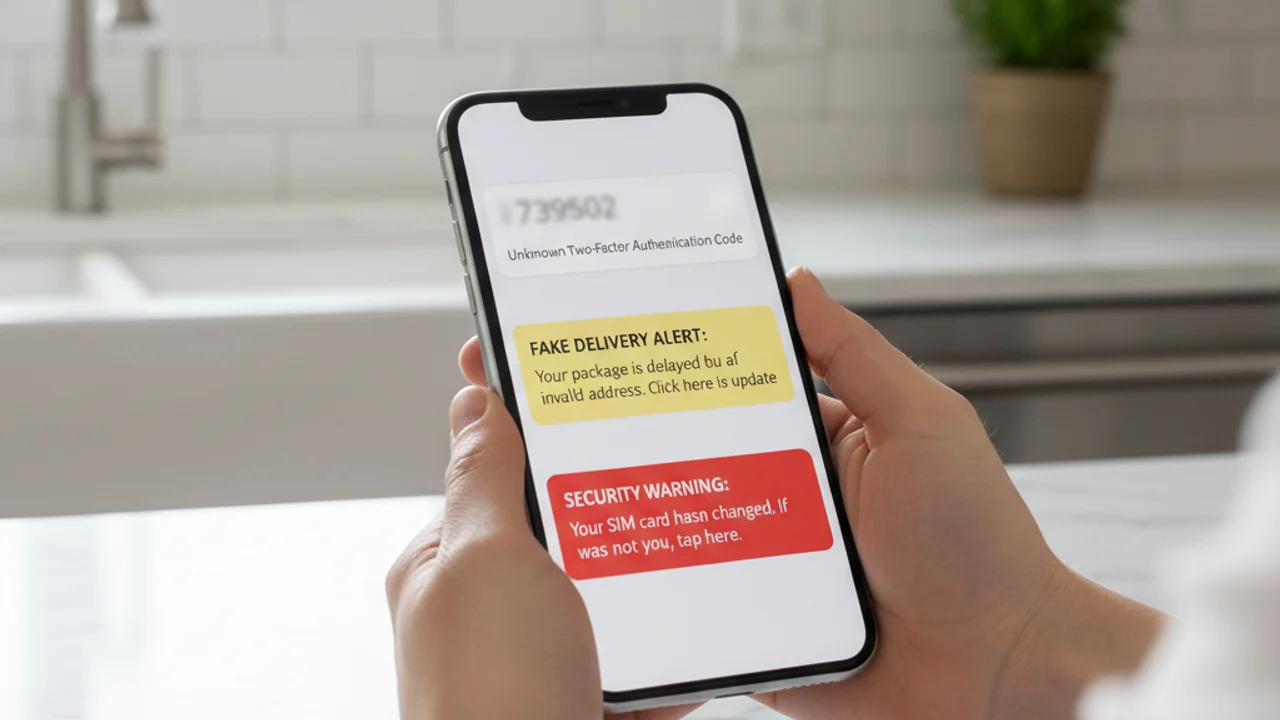
Có, điện thoại của bạn có thể bị hack, thường qua liên kết phishing, ứng dụng độc hại, Wi-Fi công cộng, tấn công SIM-swap, hoặc mật khẩu tái sử dụng bị lộ trong vi phạm dữ liệu. Dấu hiệu cảnh báo bao gồm pin tụt nhanh, ứng dụng lạ, phí bất ngờ, và mã 2FA bạn không yêu cầu.
Bạn liếc nhìn điện thoại và nhận thấy ba tin nhắn văn bản chứa mã xác thực hai yếu tố mà bạn chưa từng yêu cầu. Pin của bạn, vốn đã sạc đầy một giờ trước, giờ chỉ còn 41%. Ứng dụng ngân hàng đang yêu cầu bạn đăng nhập lại. Không có điều gì trong số này là ngẫu nhiên. Ai đó đang thử các ổ khóa trên cuộc sống số của bạn, và câu trả lời cho câu hỏi có ai có thể hack điện thoại của tôi không thật khó chịu: có, và hầu hết nạn nhân không nhận ra cho đến khi tiền đã mất.
Theo báo cáo Consumer Sentinel Network năm 2024 của FTC, người tiêu dùng Mỹ đã mất hơn 1,03 tỷ đô la vì gian lận và đánh cắp danh tính bắt đầu trên hoặc thông qua thiết bị di động. Kẻ tấn công không cần quyền truy cập vật lý vào điện thoại của bạn. Chúng chỉ cần một khoảnh khắc mất cảnh giác: một liên kết được nhấn, một ứng dụng được cài đặt, một mật khẩu tái sử dụng, một cuộc gọi đến nhà mạng của bạn, phần còn lại chỉ là đòn bẩy.
Điện thoại của bạn có thực sự bị hack được không?
Có. Từ bị hack bao trùm một phạm vi rộng, và việc hiểu loại nào đang xảy ra rất quan trọng vì cách phản ứng sẽ khác nhau. Một điện thoại hiện đại chạy hệ điều hành cập nhật thực sự khó bị xâm phạm chỉ bằng mã, các lỗ hổng hệ điều hành tồn tại, nhưng chúng đắt đỏ, hiếm và dành riêng cho các mục tiêu giá trị cao. Vụ hack hàng ngày mà hầu hết mọi người trải qua không phải là một khai thác zero-day từ xa. Đó là chiếm đoạt tài khoản, chiếm quyền SIM, phần mềm gián điệp được cài bởi ai đó có quyền truy cập vật lý ngắn, hoặc một ứng dụng độc hại mà nạn nhân bị lừa cài đặt.
Theo Báo cáo Tội phạm Internet năm 2024 của FBI, các cuộc tấn công nhắm vào thiết bị di động đã tăng đều mỗi năm trong năm năm qua, với phishing và chiếm đoạt tài khoản là các danh mục chiếm ưu thế. Mối đe dọa không nằm ở việc iPhone hay thiết bị Android của bạn về cơ bản không an toàn, mà ở chỗ con người đứng sau nó có thể bị lừa, và kẻ tấn công chỉ cần thắng một lần.
Tin tốt là: chính yếu tố con người khiến việc hack trở nên khả thi cũng khiến việc phòng ngừa trở nên khả thi. Hầu hết các cuộc tấn công điện thoại thành công đều dựa vào việc nạn nhân thực hiện một hành động cụ thể: một cú chạm, một lần cài đặt, một lần nhập mật khẩu. Nhận ra mẫu hình và cuộc tấn công sẽ sụp đổ.
Cách hack điện thoại năm 2026
Có năm con đường tấn công chiếm phần lớn áp đảo các vụ xâm phạm điện thoại năm 2026. Biết cách mỗi con đường hoạt động là nền tảng để phòng thủ trước tất cả.
Liên kết phishing và smishing. Một tin nhắn văn bản tự nhận là đến từ ngân hàng, nhà mạng, dịch vụ giao hàng hoặc cơ quan thuế của bạn. Liên kết dẫn đến một bản sao gần như hoàn hảo của trang đăng nhập thật. Bạn nhập thông tin đăng nhập. Kẻ tấn công giờ đã có chúng, cộng với bất kỳ mã 2FA nào bạn chuyển tiếp. Theo báo cáo State of the Phish năm 2024 của Proofpoint, các nỗ lực smishing đã tăng 318% so với năm trước, và một tỷ lệ đáng kể người nhận vẫn chạm vào liên kết.
Ứng dụng độc hại. Các ứng dụng tải từ nguồn ngoài cửa hàng chính thức, phiên bản chỉnh sửa của các trò chơi phổ biến, công cụ cập nhật hệ thống giả mạo, và thậm chí thỉnh thoảng có kẻ xấu lọt qua được khâu kiểm duyệt của cửa hàng chính thức, tất cả đều có thể mang phần mềm gián điệp, phần mềm theo dõi hoặc trojan ngân hàng. Sau khi cài đặt, các ứng dụng này yêu cầu quyền truy cập rộng và âm thầm thu thập thông tin đăng nhập, ảnh chụp màn hình và nội dung SMS.
Tấn công SIM-swap. Kẻ tấn công liên hệ với nhà mạng của bạn, mạo danh bạn bằng dữ liệu cá nhân thu thập từ các vụ vi phạm dữ liệu và mạng xã hội, và thuyết phục nhân viên nhà mạng chuyển số điện thoại của bạn sang một SIM mà kẻ tấn công kiểm soát. Trong vòng vài phút, mọi mã 2FA dựa trên SMS sẽ đến với chúng, không phải bạn. Theo FBI IC3, gian lận SIM-swap đã gây ra hơn 48 triệu đô la thiệt hại được báo cáo tại Mỹ năm 2024, và loại này luôn bị báo cáo thiếu vì nhiều nạn nhân ban đầu đổ lỗi cho nhà mạng.
Tái sử dụng thông tin đăng nhập từ các vụ vi phạm dữ liệu. Mỗi năm hàng tỷ cặp email và mật khẩu bị lộ trong các vụ vi phạm dữ liệu. Nếu bạn dùng lại cùng một mật khẩu trên nhiều trang web, kẻ tấn công mua cơ sở dữ liệu bị rò rỉ có thể đăng nhập vào email của bạn, sau đó bản sao lưu đám mây, sau đó tài khoản iCloud hoặc Google, sau đó điện thoại của bạn, tất cả mà không cần chạm vào thiết bị.
Wi-Fi công cộng và mạng giả mạo. Một điểm truy cập giả mạo tại quán cà phê, sân bay hoặc khách sạn có thể chặn lưu lượng không mã hóa, chèn nội dung độc hại vào các trang web và thu thập token phiên từ các ứng dụng đã đăng nhập. Mặc dù hầu hết các ứng dụng lớn hiện dùng HTTPS và ghim chứng chỉ, mối đe dọa vẫn tồn tại với các ứng dụng cũ, email không mã hóa và các trang phishing captive-portal.
7 dấu hiệu điện thoại đã bị hack
Một dấu hiệu bất thường đơn lẻ hiếm khi đủ để xác nhận sự xâm phạm, điện thoại vốn ồn ào và nhiều triệu chứng có lời giải thích vô hại. Nhưng hai dấu hiệu trở lên trong số sau đây xuất hiện cùng nhau trong cùng một tuần là một tín hiệu mạnh:
Nhận được SMS, liên kết hoặc video đáng ngờ? Quét tại truvizy.app trước khi chạm.
Cách Truvizy giúp phát hiện cuộc tấn công trước khi nó xảy ra
Tuyến phòng thủ mạnh nhất trước một vụ hack điện thoại là ngăn chặn cuộc tấn công trước khi bạn chạm vào liên kết hoặc cài đặt ứng dụng. Công nghệ phát hiện AI của Truvizy được xây dựng chính xác cho khoảnh khắc quyết định này. Khi một tin nhắn đáng ngờ đến, một cảnh báo giao hàng, một thông báo bảo mật ngân hàng, một video của người nổi tiếng mời gọi cơ hội đầu tư, một tin nhắn tuyển dụng chào mời công việc quá tốt để là thật, bạn có thể dán liên kết hoặc tải video lên Truvizy tại truvizy.app và nhận kết quả trong vài giây.
Phân tích đa lớp của Truvizy xác định các mẫu hình phổ biến trong các chiến dịch phishing di động: tên miền đăng nhập giả mạo, nội dung do AI tạo ra để xây dựng độ tin cậy giả, mẫu phishing tái sử dụng và ảnh chụp màn hình ứng dụng gian lận. Truvizy đã gắn cờ các video tuyển dụng SIM-swap đang hoạt động, cổng ngân hàng giả và mã QR thu thập thông tin đăng nhập trên nhiều chiến dịch. Hãy kiểm tra qua Truvizy bất kỳ liên kết, hình ảnh hoặc video nào bạn không chắc chắn trước khi hành động theo nó. Kết quả trả về nhanh hơn thời gian kẻ tấn công có thể phản ứng.
Phải làm gì nếu điện thoại bị hack
Nếu bạn nghi ngờ bị xâm phạm, thứ tự thực hiện rất quan trọng. Hãy làm theo các bước này từ một thiết bị sạch, một laptop, một máy tính bảng, hoặc điện thoại của người thân mà bạn tin tưởng, không phải từ chính chiếc điện thoại nghi ngờ:
1. Đổi mật khẩu email chính trước tiên. Email của bạn là con đường khôi phục cho gần như mọi tài khoản khác. Nếu kẻ tấn công có nó, mọi nỗ lực đặt lại khác đều bị xâm phạm. Dùng trình quản lý mật khẩu để tạo mật khẩu thay thế dài và duy nhất.
2. Chuyển từ 2FA qua SMS sang ứng dụng xác thực. Mã SMS có thể bị chặn bởi kẻ tấn công SIM-swap và bởi phần mềm gián điệp trên điện thoại đã bị xâm phạm. Dùng Google Authenticator, Authy, hoặc khóa bảo mật phần cứng cho bất kỳ tài khoản nào hỗ trợ. Theo hướng dẫn Xác thực Đa yếu tố của CISA , MFA dựa trên ứng dụng hoặc phần cứng có khả năng chống phishing tốt hơn rất nhiều so với SMS.
3. Gọi cho nhà mạng và yêu cầu mã PIN chuyển mạng. Đây là một mã bí mật riêng biệt cần thiết trước khi số của bạn có thể được chuyển sang SIM mới. Mọi nhà mạng lớn tại Mỹ (Verizon, AT&T, T-Mobile) hiện đều cung cấp tính năng này. Nếu bạn nghi ngờ một vụ SIM-swap đang diễn ra, hãy yêu cầu nhà mạng khóa đường dây ngay lập tức.
4. Kiểm tra các ứng dụng đã cài đặt. Trên cả iOS và Android, xem lại từng ứng dụng đã cài và gỡ bỏ bất kỳ ứng dụng nào bạn không nhận ra. Đặc biệt chú ý đến các ứng dụng có quyền trợ năng, quản trị thiết bị, hoặc nghe thông báo, đây là những quyền mà phần mềm theo dõi cần để hoạt động.
5. Cập nhật hệ điều hành. Cài đặt bản cập nhật hệ điều hành mới nhất ngay lập tức. Nhiều lỗ hổng điện thoại được dùng trong các cuộc tấn công thực tế đã được vá, nạn nhân bị xâm phạm vì họ không cập nhật.
6. Báo cáo đánh cắp danh tính và kiểm tra tín dụng. Nếu các tài khoản tài chính bị ảnh hưởng, hãy nộp báo cáo tại identitytheft.gov , cổng thông tin chính thức của FTC sẽ tạo kế hoạch khôi phục cá nhân hóa và có thể đặt cảnh báo gian lận trên hồ sơ tín dụng của bạn. Báo cáo tội phạm mạng cho FBI tại ic3.gov .
7. Khôi phục cài đặt gốc như biện pháp cuối cùng. Nếu các ứng dụng lạ xuất hiện trở lại sau khi xóa, hoặc nếu điện thoại hoạt động bất thường sau các bước trên, khôi phục cài đặt gốc hoàn toàn rồi cài lại từng ứng dụng từ cửa hàng chính thức là cách đáng tin cậy nhất để loại bỏ phần mềm độc hại dai dẳng.
Key Takeaways
- Hầu hết các vụ hack điện thoại năm 2026 không phải khai thác lạ, chúng là chạm phishing, ứng dụng sideload, SIM-swap và mật khẩu tái sử dụng. Nhận ra mẫu là chặn được cuộc tấn công.
- Quan sát hai hoặc nhiều dấu hiệu cùng nhau: mã 2FA không yêu cầu, ứng dụng lạ, pin tụt nhanh, mất tín hiệu di động hoặc hoạt động tài khoản bất ngờ.
- SIM-swap đang diễn ra hiển thị dưới dạng mất tín hiệu di động trong khi Wi-Fi hoạt động, gọi nhà mạng từ đường dây khác ngay lập tức.
- Luôn chạy liên kết, hình ảnh và video đáng ngờ qua Truvizy tại truvizy.app trước khi chạm, cài đặt hoặc trả lời.
Ghi chú phân tích chuyên gia: Các cuộc tấn công di động năm 2026 ngày càng liên kết chuỗi với nhau: một tin nhắn phishing dẫn đến thu thập thông tin đăng nhập, điều này cho phép thực hiện SIM-swap, từ đó mở khóa lần lượt mọi tài khoản được bảo vệ bằng SMS. Chặn đứng bất kỳ mắt xích nào trong chuỗi này sẽ phá vỡ toàn bộ cuộc tấn công. Hành động có tác động lớn nhất mà bất kỳ chủ điện thoại nào có thể thực hiện hôm nay là chuyển 2FA khỏi SMS sang ứng dụng xác thực hoặc khóa phần cứng, kết hợp với việc dùng công nghệ phát hiện AI của Truvizy để xác minh nội dung đáng ngờ trước khi tương tác.
Bạn nhận được ba SMS trong vòng mười phút chứa mã 2FA cho các tài khoản bạn không cố đăng nhập. Sau đó điện thoại mất tất cả tín hiệu di động trong khi Wi-Fi vẫn kết nối. Phản ứng đúng là gì?
- Đợi một giờ xem tín hiệu có quay lại không, có thể là sự cố cột phát sóng
- Trả lời SMS hỏi xem chúng từ đâu
- Xử lý như tấn công SIM-swap đang hoạt động: từ thiết bị khác, gọi nhà mạng khóa đường dây và thay đổi mật khẩu email
- Khởi động lại điện thoại để xóa sự cố
Answer: Nhiều mã 2FA không yêu cầu cộng với mất tín hiệu di động đột ngột là mẫu kinh điển của tấn công SIM-swap. Mỗi phút đều quan trọng. Dùng thiết bị khác gọi nhà mạng, khóa đường dây, sau đó thay đổi mật khẩu bắt đầu từ email chính.
Phản ứng vi phạm dữ liệu: phải làm gì khi thông tin bị lộ — Rò rỉ thông tin xác thực giúp hack điện thoại, và cách khóa tài khoản trước khi kẻ tấn công hành động
Smishing: phishing SMS hoạt động ra sao và làm sao chặn nó — Các SMS bắt đầu hầu hết các vụ xâm phạm điện thoại, chúng trông thế nào và làm sao nhận biết
Danh tính của tôi bị đánh cắp, giờ phải làm gì? — Lộ trình khôi phục đầy đủ cho nạn nhân đánh cắp danh tính, bao gồm đóng băng tín dụng và báo cáo chính thức
FAQ
Có ai có thể hack điện thoại tôi chỉ bằng cách biết số của tôi không?
Chỉ biết số không đủ để chiếm quyền một điện thoại thông minh hiện đại, nhưng đủ để khởi động các cuộc tấn công dẫn đến chiếm quyền: SMS lừa đảo, yêu cầu SIM-swap đến nhà mạng, cuộc gọi xác minh giả mạo, và luồng khôi phục tài khoản nhắm mục tiêu. Theo báo cáo FBI IC3 2024, lừa đảo SIM-swap riêng đã gây tổn thất hơn 48 triệu đô la cho nạn nhân Mỹ.
Dấu hiệu phổ biến nhất rằng điện thoại tôi bị hack là gì?
Các dấu hiệu đáng tin cậy nhất: mã 2FA không yêu cầu, email đặt lại mật khẩu cho tài khoản không động đến, ứng dụng lạ không cài đặt, pin tụt nhanh hoặc nóng khi không dùng, lưu lượng dữ liệu di động tăng đột biến, nhà mạng hiển thị đường dây của bạn trên SIM không quen, bạn bè nhận tin nhắn bạn không gửi. Hai hoặc nhiều cùng lúc là tín hiệu mạnh.
Tin tặc thực sự xâm nhập điện thoại như thế nào năm 2026?
Năm 2026 bốn đường chính: liên kết phishing qua SMS hoặc ứng dụng nhắn tin (smishing), ứng dụng độc hại tải bên ngoài cửa hàng chính thức, chiếm quyền tài khoản qua thông tin xác thực tái sử dụng bị lộ, và tấn công SIM-swap chiếm số điện thoại tại nhà mạng. Theo Verizon 2024 DBIR, yếu tố con người liên quan đến 68% các vụ vi phạm.
Truvizy có giúp tôi kiểm tra xem liên kết hoặc video đáng ngờ có phải là một phần của lừa đảo hack điện thoại không?
Có. Phân tích AI của Truvizy tại truvizy.app quét các liên kết, video và hình ảnh đáng ngờ để tìm các mẫu chiến dịch phishing di động. Tại Việt Nam, Cục An toàn thông tin (Bộ TT&TT) và hệ thống Tín nhiệm mạng là kênh chính thức báo cáo lừa đảo trực tuyến.
Điều đầu tiên cần làm nếu nghĩ điện thoại đã bị hack?
Chuyển sang thiết bị sạch, laptop tin cậy hoặc điện thoại của thành viên gia đình. Từ đó, thay đổi mật khẩu email chính trước, sau đó ngân hàng, sau đó bất kỳ tài khoản nào dùng số bạn để khôi phục. Bật ứng dụng xác thực thay vì SMS cho 2FA. Gọi nhà mạng để khóa SIM và yêu cầu PIN port-out.