Ǹjẹ́ ẹnìkan lè gé fóònù mi mọ́lẹ̀? Àwọn àmì, ewu, àti ohun tí o lè ṣe ní 2026
Ǹjẹ́ ẹnìkan lè gé fóònù mi mọ́lẹ̀? Bẹ́ẹ̀ ni, àti ọ̀pọ̀lọpọ̀ àwọn olùjìyà kò máa kíyè sí i. Kọ́ àwọn àmì ìkìlọ̀ méje fún fóònù tí a ti gé mọ́lẹ̀ àti àwọn ìgbésẹ̀ tó péye láti dí àwọn agbéraga.
TL;DR
Bẹ́ẹ̀ ni, fóònù rẹ lè di géré, ní ọ̀pọ̀ ìgbà nípasẹ̀ àwọn ìjápọ̀ phishing, àwọn ohun-ìṣe burúkú, Wi-Fi gbangba, ìjà SIM-swap, tàbí àwọn ọ̀rọ̀-ìkọ̀kọ̀ tí a tún lò tí ó jẹ́ kíkà.
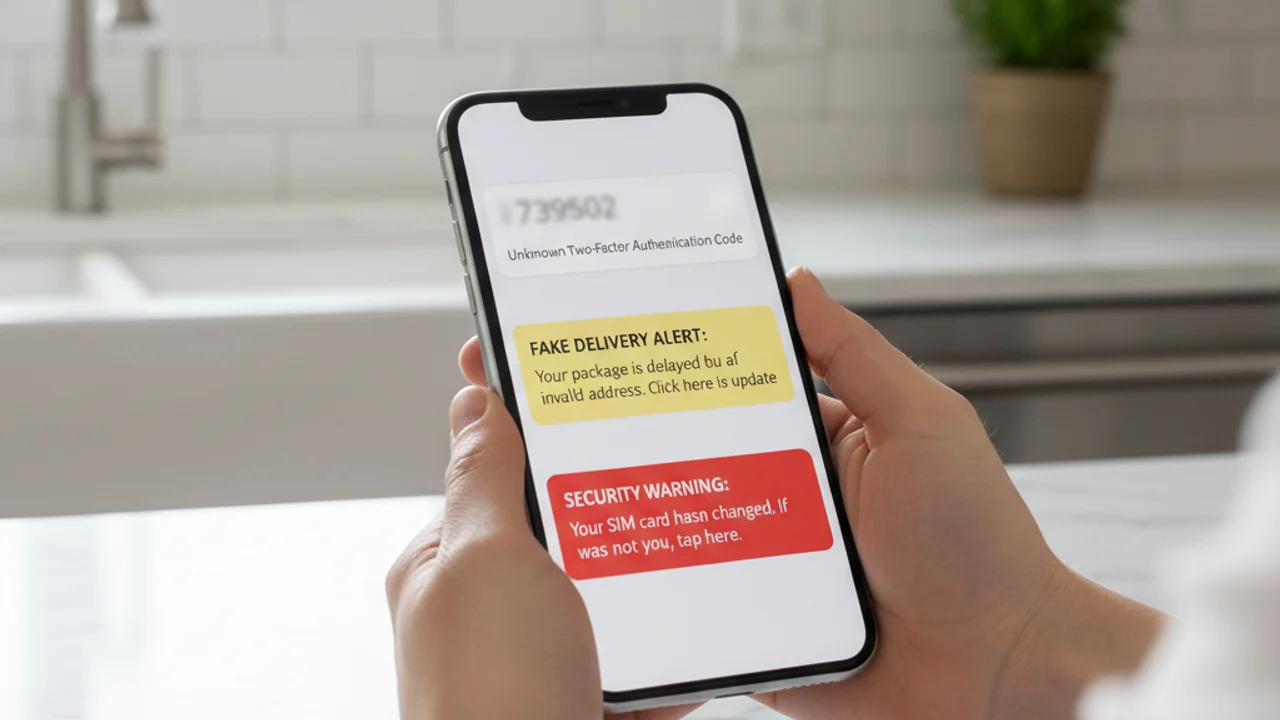
O wo fóònù rẹ, o sì rí àwọn ọ̀rọ̀ mẹ́ta pẹ̀lú àwọn kóòdù 2FA tí o kò tí ì béèrè fún rí. Bátìrì rẹ, tí ó kún pátápátá wákàtí kan sẹ́yìn, wà ní 41% nísinsìnyí. App báńkì rẹ ń béèrè kí o tún wọlé. Kò sí ohun kan nínú èyí tí ó jẹ́ lásán. Ẹnìkan ń dán àwọn ìdábùú ìwàláàyè dígítà rẹ wò, àti ìdáhùn sí ìbéèrè náà "ṣé ẹnìkan lè gé fóònù mi mọ́lẹ̀" kò dùn mọ́ni: bẹ́ẹ̀ ni, àti ọ̀pọ̀lọpọ̀ àwọn olùjìyà kò kíyè sí i títí owó yóò fi ti lọ́.
Gẹ́gẹ́ bí ìròyìn Consumer Sentinel Network ti FTC fún 2024, àwọn oníbàárà ní Amẹ́ríkà pàdánù ju dọ́là bílíọ̀nù 1.03 lọ sí jìbìtì àti jíjí ìdánimọ̀ tí ó bẹ̀rẹ̀ lórí tàbí nípasẹ̀ ẹ̀rọ alágbèéká. Àwọn agbéraga kò nílò láti fọwọ́ kan fóònù rẹ gan-an. Gbogbo ohun tí wọ́n nílò ni ìṣẹ́jú kan tí a kò kíyè sí i: ìjápọ̀ tí a tẹ̀, app tí a fi sórí ẹ̀rọ, ọ̀rọ̀-ìkọ̀kọ̀ tí a tún lò, ìpè kan sí ilé-iṣẹ́ fóònù rẹ, tí ìyókù á sì di àǹfààní fún wọn.
Ṣé A Lè Gé Fóònù Rẹ Mọ́lẹ̀ Ní Tòótọ́?
Bẹ́ẹ̀ ni. Ọ̀rọ̀ náà "gé mọ́lẹ̀" ní ọ̀pọ̀ ìtumọ̀ nínú, mímọ irú èyí tí ó ṣẹlẹ̀ sì ṣe pàtàkì nítorí pé ìdáhùn yàtọ̀. Ó ṣòro gan-an láti gé fóònù òde-òní tí ó ní ẹ̀rọ ìṣiṣẹ́ tuntun mọ́lẹ̀ pẹ̀lú kóòdù nìkan: àwọn àlébù nínú ẹ̀rọ ìṣiṣẹ́ ń bẹ, ṣùgbọ́n wọ́n wọ́n, wọ́n sì ṣọ̀wọ́n, a sì máa ń pa wọ́n mọ́ fún àwọn góńgó iyebíye jùlọ. "Gígé mọ́lẹ̀" ojoojúmọ́ tí ọ̀pọ̀ ènìyàn ń dojú kọ kì í ṣe ìkọlù zero-day láti ọ̀nà jíjìn. Ó jẹ́ gbígba àkọọ́lẹ̀, jíjí SIM, ohun èlò amí tí ẹnìkan tí ó ní ààyè kúkúrú sí ẹ̀rọ náà fi sórí rẹ̀, tàbí app burúkú tí a tan olùjìyà náà jẹ láti fi sórí ẹ̀rọ.
Gẹ́gẹ́ bí Ìròyìn Ìwà-ọ̀daràn Ayélujára ti FBI fún 2024, àwọn ìkọlù tí ó fojú sí fóònù ti ń pọ̀ sí i lọ́dọọdún fún ọdún márùn-ún sẹ́yìn, pẹ̀lú phishing àti gbígba àkọọ́lẹ̀ gẹ́gẹ́ bí àwọn ẹ̀ka tí ó ṣe pàtàkì jùlọ. Ewu náà kì í ṣe pé fóònù rẹ, bóyá iPhone tàbí Android, kò ní ààbò látinú ìpìlẹ̀, bí kò ṣe pé a lè tan ẹni tí ó ń lò ó jẹ, agbéraga sì kàn nílò láti borí lẹ́ẹ̀kan ṣoṣo.
Ìhìn rere ni pé: apá ènìyàn kan náà tí ó jẹ́ kí gígé mọ́lẹ̀ ṣeéṣe ni ó tún jẹ́ kí ìdènà ṣeéṣe. Ọ̀pọ̀lọpọ̀ àwọn ìkọlù fóònù tí ó ṣàṣeyọrí gbára lé olùjìyà láti ṣe ìgbésẹ̀ kan pàtó: ìtẹ̀, ìfisórí-ẹ̀rọ, tàbí kíkọ ọ̀rọ̀-ìkọ̀kọ̀ sí ibì kan. Bí a bá dá àpẹẹrẹ náà mọ̀, ìkọlù náà á wó lulẹ̀.
Bí Ẹnìkan Ṣe Ń Gé Fóònù Mọ́lẹ̀ Ní 2026
Ọ̀nà márùn-ún ni ó ń fa ọ̀pọ̀lọpọ̀ jùlọ àwọn ìṣẹ̀lẹ̀ gígé fóònù mọ́lẹ̀ ní 2026. Mímọ bí ọ̀kọ̀ọ̀kan wọn ṣe ń ṣiṣẹ́ ni ìpìlẹ̀ fún dídáàbò bo ara ẹni lọ́wọ́ gbogbo wọn.
Àwọn ìjápọ̀ phishing àti smishing. Ọ̀rọ̀ kan á sọ pé ó wá láti ọ̀dọ̀ báǹkì rẹ, ilé-iṣẹ́ fóònù rẹ, iṣẹ́ ìfìjíṣẹ́ kan, tàbí ilé-iṣẹ́ owó-orí. Ìjápọ̀ náà á mú ọ lọ sí ojú-ìwé tí ó fẹ́rẹ̀ jọ ojú-ìwé ìwọlé tòótọ́ pátápátá. O á kọ àlàyé ìwọlé rẹ sí i. Nísinsìnyí, agbéraga náà ti ní wọ́n lọ́wọ́, pẹ̀lú kóòdù 2FA kankan tí o bá tún fi ránṣẹ́. Gẹ́gẹ́ bí ìròyìn State of the Phish ti Proofpoint fún 2024, ìgbìyànjú smishing pọ̀ sí i ní ìdá 318 nínú ọgọ́rùn-ún láti ọdún dé ọdún, ọ̀pọ̀lọpọ̀ àwọn tí ó gbà wọ́n sì ń tẹ̀ wọ́n síbẹ̀.
Àwọn app burúkú. Àwọn app tí a gbé kalẹ̀ láti àwọn ilé-ìtajà tí kò jẹ́ ojúlówó, àwọn ẹ̀yà tí a yí padà nínú àwọn eré tí ó gbajúmọ̀, àwọn irinṣẹ́ "ìtúnṣe ẹ̀rọ" tí ó jẹ́ èké, àti kódà àwọn tí ó burú tí ó lè yọ́ kọjá àyẹ̀wò ilé-ìtajà tí ó jẹ́ ojúlówó lẹ́ẹ̀kọ̀ọ̀kan lè gbé ohun èlò amí, stalkerware, tàbí trojan báńkì. Lẹ́yìn tí a bá ti fi wọ́n sórí ẹ̀rọ, àwọn app wọ̀nyí á béèrè fún àṣẹ tí ó gbòòrò, wọn á sì máa kó àlàyé ìwọlé, àwòrán ojú-ẹ̀rọ, àti àkóónú SMS jọ ní jẹ́jẹ́.
Ìkọlù SIM-swap. Agbéraga náà á kàn sí ilé-iṣẹ́ fóònù alágbèéká rẹ, á díbọ́n pé òun ni ọ́ nípa lílo àlàyé ara-ẹni tí a kó jọ láti ibi ìjó data àti àwọn ẹ̀rọ ìbánisọ̀rọ̀ láwùjọ, á sì yí ọkàn aṣojú ilé-iṣẹ́ fóònù náà padà láti fi nọ́mbà fóònù rẹ sí orí SIM tí agbéraga náà ń darí. Láàrin ìṣẹ́jú díẹ̀, gbogbo kóòdù 2FA tí ó dá lórí SMS á lọ sọ́dọ̀ rẹ̀, kì í ṣe sọ́dọ̀ rẹ. Gẹ́gẹ́ bí FBI IC3, jìbìtì SIM-swap fa ìpàdánù tí a ròyìn ní Amẹ́ríkà tí ó ju mílíọ̀nù dọ́là 48 lọ ní 2024, wọn kì í sì í ròyìn ẹ̀ka yìí dáadáa nítorí pé ọ̀pọ̀lọpọ̀ olùjìyà máa ń dá ilé-iṣẹ́ fóònù lẹ́bi ní àkọ́kọ́.
Àtúnlò àlàyé ìwọlé láti inú jíjó data. Ní ọdọọdún, bílíọ̀nù àwọn àkópọ̀ í-méèlì àti ọ̀rọ̀-ìkọ̀kọ̀ ń jáde sí gbangba nínú jíjó data. Bí o bá ń tún ọ̀rọ̀-ìkọ̀kọ̀ kan náà lò lórí ọ̀pọ̀lọpọ̀ ojú-òpó, agbéraga tí ó rà dátábèèsì tí ó jó lè wọlé sí í-méèlì rẹ, lẹ́yìn náà sí ẹ̀dà-àbò rẹ tí ó wà lórí kíláwúdì, lẹ́yìn náà sí àkọọ́lẹ̀ iCloud tàbí Google rẹ, lẹ́yìn náà sí fóònù rẹ, láìsí fọwọ́ kan ẹ̀rọ náà rárá.
Wi-Fi gbangba àti àwọn nẹ́tíwọ̀kì tí kò ní ìdánilójú. Ibi ìjápọ̀ tí kò ní ìdánilójú nínú ilé-ìtajà kọfí, pápá ọkọ̀ òfurufú, tàbí hotẹ́ẹ̀lì lè dá ìjápọ̀ tí kò ní kóòdù dúró láàrin ọ̀nà, fi àkóónú burúkú sínú àwọn ojú-ìwé, kí ó sì kó àmì-ìjápọ̀ láti àwọn app tí a ti wọlé sí jọ. Bí ó tilẹ̀ jẹ́ pé ọ̀pọ̀lọpọ̀ àwọn app ńlá ń lo HTTPS àti certificate pinning nísinsìnyí, ewu náà ṣì wà fún àwọn app àtijọ́, í-méèlì tí kò ní kóòdù, àti àwọn ojú-ìwé phishing captive-portal.
Àwọn Àmì Méje Tí Ó Fi Hàn Pé A Ti Gé Fóònù Rẹ Mọ́lẹ̀
Àìṣedéédé kan ṣoṣo kì í sábà tó láti fi ìdí ìṣẹ̀lẹ̀ gígé mọ́lẹ̀ múlẹ̀, nítorí àwọn fóònù á máa hùwà lọ́nà tí kò dájú, ọ̀pọ̀lọpọ̀ àwọn àmì sì lè ní àlàyé tí kò léwu. Ṣùgbọ́n bí méjì tàbí jù bẹ́ẹ̀ lọ nínú àwọn èyí tí ó tẹ̀lé e bá farahàn papọ̀ láàrin ọ̀sẹ̀ kan náà, ó jẹ́ àmì tí ó lágbára:
Ṣé o rí ọ̀rọ̀, ìjápọ̀, tàbí fídíò tí ó fura? Ṣe àyẹ̀wò rẹ̀ ní truvizy.app kí o tó tẹ̀ ẹ́.
Bí Truvizy Ṣe Ràn Ọ́ Lọ́wọ́ Láti Mọ Ìkọlù Kí Ó Tó Dé
Ààbò tí ó lágbára jùlọ lòdì sí gígé fóònù mọ́lẹ̀ ni dídá ìkọlù náà dúró kí o tó tẹ ìjápọ̀ náà tàbí fi app náà sórí ẹ̀rọ. A kọ́ ìmọ̀ AI ti Truvizy fún ìṣẹ́jú ìpinnu yìí gan-an. Nígbà tí ọ̀rọ̀ tí ó fura bá dé, bóyá ìkìlọ̀ "ìfìjíṣẹ́ ọjà", ìwífún "ààbò báǹkì", fídíò olókìkí kan tí ó ń fi àǹfààní ìdókòwò hàn, tàbí ọ̀rọ̀ olùgbaṣíṣẹ́ tí ó ń fi iṣẹ́ tí ó dára ju bí ó ti yẹ lọ hàn, o lè fi ìjápọ̀ náà sí i tàbí fi fídíò náà sí Truvizy ní truvizy.app kí o sì gba ìdáhùn láàrin ìṣẹ́jú-aayá.
Ìtúpalẹ̀ ọ̀pọ̀lọpọ̀ ìpele ti Truvizy ń dá àwọn àpẹẹrẹ tí ó wọ́pọ̀ nínú àwọn ìdẹkùn phishing fóònù mọ̀: àwọn ìpínlẹ̀ ìwọlé èké, àkóónú tí AI ṣe tí a lò láti kọ́ ìgbẹ́kẹ̀lé èké, àwọn àwòṣe phishing tí a tún lò, àti àwòrán ojú-ẹ̀rọ app tí ó jẹ́ jìbìtì. Truvizy ti dá àwọn fídíò gbígba èniyàn ṣiṣẹ́ SIM-swap tí ó ń ṣiṣẹ́, àwọn ibi báńkì èké, àti àwọn kóòdù QR tí ó ń kó àlàyé ìwọlé jọ mọ̀ ní ọ̀pọ̀lọpọ̀ ìdẹkùn. Fi ìjápọ̀, àwòrán, tàbí fídíò kankan tí o kò dá lójú rẹ̀ ṣe ìdánwò nípasẹ̀ Truvizy kí o tó ṣe ohunkóhun sí i. Ìdáhùn náà á padà wá yára ju bí agbéraga náà ṣe lè dáhùn padà.
Ohun Tí O Yẹ Kí O Ṣe Bí A Bá Ti Gé Fóònù Rẹ Mọ́lẹ̀
Bí o bá fura pé fóònù rẹ ti bà jẹ́, ìtòlẹ́sẹẹsẹ àwọn ìgbésẹ̀ ṣe pàtàkì. Tẹ̀lé àwọn ìgbésẹ̀ wọ̀nyí láti orí ẹ̀rọ mímọ́, kọ̀ǹpútà alágbèéká, tábìlẹ́ẹ̀tì, tàbí fóònù ọmọ ẹbí rẹ tí o gbẹ́kẹ̀lé, kì í ṣe láti orí fóònù tí ó fura fúnra rẹ̀:
1. Kọ́kọ́ yí ọ̀rọ̀-ìkọ̀kọ̀ í-méèlì àkọ́kọ́ rẹ padà. Í-méèlì rẹ ni ọ̀nà ìgbaptun fún fẹ́rẹ̀ẹ́ jẹ́ gbogbo àkọọ́lẹ̀ mìíràn. Bí agbéraga bá ní i lọ́wọ́, gbogbo ìgbìyànjú àtúnṣe mìíràn á bà jẹ́. Lo alábòójútó ọ̀rọ̀-ìkọ̀kọ̀ láti dá ọ̀rọ̀-ìkọ̀kọ̀ tuntun kan tí ó gùn tí ó sì ṣàrà ọ̀tọ̀.
2. Yí padà láti SMS 2FA sí app ìmúdájú kan. Àwọn kóòdù SMS lè jẹ́ gbígbà ní àárín ọ̀nà láti ọwọ́ àwọn agbéraga SIM-swap àti láti ọwọ́ ohun èlò amí lórí fóònù tí ó ti bà jẹ́. Lo Google Authenticator, Authy, tàbí kọ́kọ́rọ́ ààbò ohun-èlò líle fún àkọọ́lẹ̀ kankan tí ó ń ṣètìlẹ́yìn fún un. Gẹ́gẹ́ bí ìtọ́sọ́nà Ìmúdájú Ọ̀pọ̀lọpọ̀-Apá ti CISA , MFA tí ó dá lórí app tàbí ohun-èlò líle ní agbára ìtakò sí phishing tí ó ga jù ti SMS lọ.
3. Pe ilé-iṣẹ́ fóònù rẹ kí o sì béèrè fún port-out PIN kan. Èyí jẹ́ àṣírí ọ̀tọ̀ tí a nílò kí a tó lè fi nọ́mbà rẹ sí SIM tuntun. Gbogbo ilé-iṣẹ́ fóònù ńlá ní Amẹ́ríkà (Verizon, AT&T, T-Mobile) ń fúnni ní èyí nísinsìnyí. Bí o bá fura pé SIM-swap ti ń lọ lọ́wọ́ tẹ́lẹ̀, béèrè lọ́wọ́ ilé-iṣẹ́ fóònù náà láti sé ìjápọ̀ náà lẹ́sẹ̀kẹsẹ̀.
4. Ṣe àyẹ̀wò àwọn app tí ó wà lórí ẹ̀rọ. Lórí iOS àti Android méjèèjì, ṣe àyẹ̀wò app kọ̀ọ̀kan tí ó wà lórí ẹ̀rọ kí o sì yọ ohunkóhun tí o kò mọ̀ kúrò. Fi ọkàn sí àwọn app tí ó ní àṣẹ ìrànwọ́ (accessibility), àkóso ẹ̀rọ, tàbí ìgbọ́ràn sí ìkìlọ̀, nítorí àwọn àṣẹ wọ̀nyí ni stalkerware nílò láti ṣiṣẹ́.
5. Ṣe àmúdọ́gba ẹ̀rọ ìṣiṣẹ́ náà. Fi àmúdọ́gba OS tuntun jùlọ sórí ẹ̀rọ lẹ́sẹ̀kẹsẹ̀. Ọ̀pọ̀lọpọ̀ àwọn àlébù fóònù tí a lò nínú àwọn ìkọlù tòótọ́ ni a ti tún ṣe tẹ́lẹ̀ nípasẹ̀ àmúdọ́gba, àwọn olùjìyà sì máa ń bà jẹ́ nítorí pé wọn kò ṣe àmúdọ́gba.
6. Fi jíjí ìdánimọ̀ ránṣẹ́ kí o sì ṣe àyẹ̀wò kírẹ́díìtì rẹ. Bí àwọn àkọọ́lẹ̀ owó bá ti kan, fi ìròyìn ránṣẹ́ ní identitytheft.gov , ojú-òpó tí ó jẹ́ ojúlówó ti FTC á ṣẹ̀dá ètò ìgbaptun tí ó bá ọ mu, ó sì lè fi ìkìlọ̀ jìbìtì sí orí kírẹ́díìtì rẹ. Fi ìwà-ọ̀daràn ayélujára ránṣẹ́ sí FBI ní ic3.gov .
7. Ṣíṣe factory reset gẹ́gẹ́ bí ìgbésẹ̀ ìkẹyìn. Bí àwọn app tí kò mọ̀ bá tún farahàn lẹ́yìn tí a bá ti pa wọ́n rẹ́, tàbí bí fóònù náà bá hùwà lọ́nà tí kò dájú lẹ́yìn àwọn ìgbésẹ̀ tí ó wà lókè yìí, factory reset pípé, tí a tẹ̀lé pẹ̀lú fífi àwọn app padà sórí ẹ̀rọ ọ̀kan ọ̀kan láti ilé-ìtajà tí ó jẹ́ ojúlówó, ni ọ̀nà tí ó fẹsẹ̀múlẹ̀ jùlọ láti yọ ohun-èlò burúkú tí ó ń dúró síbẹ̀ kúrò.
Key Takeaways
- Ọ̀pọ̀lọpọ̀ àwọn ìṣẹ̀lẹ̀ gígé fóònù mọ́lẹ̀ ní 2026 kì í ṣe àwọn àlébù àràmọ̀dà, wọ́n jẹ́ ìtẹ̀ phishing, àwọn app tí a gbé kalẹ̀ láti ìta, SIM-swap, àti ọ̀rọ̀-ìkọ̀kọ̀ tí a tún lò. Mímọ àpẹẹrẹ náà ń dá ìkọlù náà dúró.
- Ṣọ́ra fún méjì tàbí jù bẹ́ẹ̀ lọ nínú àwọn àmì ìkìlọ̀ wọ̀nyí papọ̀: kóòdù 2FA tí a kò béèrè fún, app tí kò mọ̀ ọ́n, bátìrì tí ń tán yára, ìjápọ̀ nẹ́tíwọ̀kì tí ó pàdánù, tàbí ìgbòkègbodò àkọọ́lẹ̀ tí kò yẹ.
- SIM-swap tí ó ń lọ lọ́wọ́ máa ń fara hàn bí fóònù rẹ tí ó pàdánù ìjápọ̀ nẹ́tíwọ̀kì nígbà tí Wi-Fi ń ṣiṣẹ́, pe ilé-iṣẹ́ fóònù rẹ láti orí ìjápọ̀ mìíràn lẹ́sẹ̀kẹsẹ̀.
- Nígbà gbogbo, fi àwọn ìjápọ̀, àwòrán, àti fídíò tí ó fura ṣe ìdánwò nípasẹ̀ Truvizy ní truvizy.app kí o tó tẹ̀, fi sórí ẹ̀rọ, tàbí dáhùn.
Àkíyèsí ìtúpalẹ̀ akọ́ṣẹ́mọṣẹ́: Àwọn ìkọlù fóònù ní 2026 ń so ara wọn pọ̀ ní ọ̀wọ̀ọ̀wọ̀ ju ti tẹ́lẹ̀ lọ, ọ̀rọ̀ phishing kan á yọrí sí ìkójọ àlàyé ìwọlé, tí ó sì ṣí ọ̀nà sílẹ̀ fún SIM-swap, tí ó sì lẹ́yìn náà ṣí gbogbo àkọọ́lẹ̀ tí SMS dáàbò bò lẹ́sẹẹsẹ. Dídáàbò bo ara ẹni lọ́wọ́ ọ̀kan pàápàá nínú àwọn ọ̀wọ́ yìí á fọ́ gbogbo ìkọlù náà túútúú. Ìgbésẹ̀ kan ṣoṣo tí ó ní agbára jùlọ tí ẹnikẹ́ni tí ó ní fóònù lè ṣe lónìí ni yíyí 2FA padà kúrò ní SMS sí app ìmúdájú tàbí kọ́kọ́rọ́ ohun-èlò líle, papọ̀ mọ́ lílo ìmọ̀ AI ti Truvizy láti fi ìdí àkóónú tí ó fura múlẹ̀ kí a tó bá a lò.
O gba ọ̀rọ̀ mẹ́ta láàrin ìṣẹ́jú mẹ́wàá tí ó ní kóòdù 2FA nínú fún àwọn àkọọ́lẹ̀ tí o kò tí ì gbìyànjú láti wọlé sí. Lẹ́yìn náà, fóònù rẹ á pàdánù ìjápọ̀ nẹ́tíwọ̀kì pátápátá nígbà tí ó ṣì ń fi Wi-Fi hàn bí ó ti so pọ̀. Kí ni ìdáhùn tí ó tọ́?
- Dúró wákàtí kan láti wo bóyá ìjápọ̀ náà á padà, ó lè jẹ́ ìṣòro àwọn ilé-ìsọ nẹ́tíwọ̀kì
- Dáhùn àwọn ọ̀rọ̀ náà, béèrè ẹni tí ó rán wọn
- Ka a sí ìkọlù SIM-swap tí ó ń lọ lọ́wọ́: láti orí ẹ̀rọ mìíràn, pe ilé-iṣẹ́ fóònù rẹ láti sé ìjápọ̀ náà kí o sì yí ọ̀rọ̀-ìkọ̀kọ̀ í-méèlì rẹ padà
- Tún fóònù náà bẹ̀rẹ̀ láti yanjú ìṣòro náà
Answer: Ọ̀pọ̀lọpọ̀ kóòdù 2FA tí a kò béèrè fún pẹ̀lú ìpàdánù ìjápọ̀ nẹ́tíwọ̀kì lójijì ni àpẹẹrẹ ìkọlù SIM-swap tí a mọ̀ dáadáa. Ìṣẹ́jú kọ̀ọ̀kan ṣe pàtàkì.
Ìdáhùn sí Jíjó Data: Ohun Tí O Yẹ Kí O Ṣe Nígbà Tí Àlàyé Rẹ Bá Jáde Sí Gbangba — Àwọn jíjó àlàyé ìwọlé tí ó ń jẹ́ kí gígé fóònù mọ́lẹ̀ ṣeéṣe, àti bí a ṣe lè sé àwọn àkọọ́lẹ̀ kí àwọn agbéraga tó lè ṣe ohunkóhun
Smishing: Bí Ìdẹkùn SMS Phishing Ṣe Ń Ṣiṣẹ́ àti Bí A Ṣe Lè Dá A Dúró — Àwọn ọ̀rọ̀ tí ó ń bẹ̀rẹ̀ ọ̀pọ̀lọpọ̀ àwọn ìṣẹ̀lẹ̀ gígé fóònù mọ́lẹ̀, bí wọ́n ṣe rí, àti bí a ṣe lè dá wọn mọ̀
A Ti Jí Ìdánimọ̀ Mi, Kí Ni Nísinsìnyí? — Ètò ìgbaptun kíkún fún àwọn olùjìyà jíjí ìdánimọ̀, tí ó fi dídí kírẹ́díìtì àti ìròyìn sí FTC kún un
FAQ
Ṣé ẹnìkan lè gé fóònù mi mọ́lẹ̀ nípa mímọ nọ́mbà mi nìkan?
Mímọ nọ́mbà rẹ nìkan kò tó láti gba fóònù ọlọ́gbọ́n òde-òní, ṣùgbọ́n ó tó láti bẹ̀rẹ̀ àwọn ìkọlù tí ó lè yọrí sí gbígba fóònù náà: àwọn ọ̀rọ̀ phishing, àwọn ìbéèrè SIM-swap sí ilé-iṣẹ́ fóònù rẹ, àwọn ìpè ìmúdájú èké, àti àwọn ìlànà ìgbaptun-àkọọ́lẹ̀ tí a fojú sí ọ. Gẹ́gẹ́ bí Ìròyìn Ìwà-ọ̀daràn Ayélujára FBI IC3 fún ọdún 2024, jìbìtì SIM-swap nìkan ti mú kí àwọn olùjìyà ní Amẹ́ríkà pàdánù ó lé ní mílíọ̀nù dọ́là 48 ní ìpàdánù tí a ròyìn.
Kí ni àwọn àmì tí ó wọ́pọ̀ jùlọ tí ó fi hàn pé a ti gé fóònù mi mọ́lẹ̀?
Àwọn kóòdù 2FA tí o kò béèrè fún, àwọn í-méèlì àtúnṣe ọ̀rọ̀-ìkọ̀kọ̀ fún àwọn àkọọ́lẹ̀ tí o kò fọwọ́ kàn, àwọn app tí kò mọ̀ ọ́n, bátìrì tí ń tán yára tàbí ẹ̀rọ tí ń gbóná nígbà tí a kò ń lò ó, àwọn ìlọsíwájú lójijì nínú lílo dátà fóònù, ilé-iṣẹ́ fóònù rẹ tí ó fi hàn pé nọ́mbà rẹ ń ṣiṣẹ́ lórí SIM kan tí o kò dá mọ̀, àti àwọn ọ̀rẹ́ tí ó ń gba àwọn ọ̀rọ̀ láti ọ̀dọ̀ rẹ tí o kò rán. Bí méjì tàbí jù bẹ́ẹ̀ lọ nínú àwọn wọ̀nyí bá jọ farahàn, ó jẹ́ àmì tí ó lágbára.
Báwo ni àwọn agbéraga ṣe ń wọ inú fóònù ní ọdún 2026?
Ní ọdún 2026, ọ̀nà mẹ́rin tí ó ga jùlọ ni: àwọn ìjápọ̀ phishing tí a rán nípasẹ̀ SMS tàbí àwọn app ìránṣẹ́ (smishing), àwọn app burúkú tí a gbé kalẹ̀ lóde àwọn ilé-ìtajà app tí ó jẹ́ ojúlówó, gbígba àkọọ́lẹ̀ nípasẹ̀ àlàyé ìwọlé tí a tún lò lórí àwọn ojú-òpó tí a ti gé mọ́lẹ̀, àti ìkọlù SIM-swap tí ó ń jí nọ́mbà fóònù rẹ ní ìpele ilé-iṣẹ́ fóònù. Gẹ́gẹ́ bí Ìròyìn DBIR ti Verizon fún ọdún 2024, apá ènìyàn kópa nínú ìdá 68 nínú ọgọ́rùn-ún àwọn ìṣẹ̀lẹ̀ ìwọ́lulẹ̀.
Ṣé Truvizy lè ràn mí lọ́wọ́ láti mọ̀ bóyá ìjápọ̀ tàbí fídíò kan tí ó fura jẹ́ apá kan ìdẹkùn gígé fóònù mọ́lẹ̀?
Bẹ́ẹ̀ ni. Ìtúpalẹ̀ AI ti Truvizy ní truvizy.app ń wádìí àwọn ìjápọ̀, fídíò, àti àwòrán tí ó fura fún àwọn àpẹẹrẹ tí a máa ń lò nínú àwọn ìdẹkùn phishing fóònù. Fi ìjápọ̀ tàbí ọ̀rọ̀ kankan tí o kò dá lójú rẹ̀ ṣe ìdánwò nípasẹ̀ Truvizy kí o tó tẹ̀ ẹ́, fi sórí ẹ̀rọ, tàbí dáhùn.
Kí ni mo yẹ kí n kọ́kọ́ ṣe bí mo bá rò pé a ti gé fóònù mi mọ́lẹ̀?
Lọ sí ẹ̀rọ mímọ́: kọ̀ǹpútà alágbèéká tí o gbẹ́kẹ̀lé tàbí fóònù ọmọ ẹbí rẹ. Láti ibẹ̀, kọ́kọ́ yí ọ̀rọ̀-ìkọ̀kọ̀ àkọọ́lẹ̀ í-méèlì àkọ́kọ́ rẹ padà, lẹ́yìn náà tí báǹkì rẹ, lẹ́yìn náà ti àkọọ́lẹ̀ èyíkéyìí tí ó ń lo nọ́mbà fóònù rẹ fún ìgbaptun. Mú app ìmúdájú ṣiṣẹ́ dípò SMS fún ìmúdájú ìlọ́po-méjì. Pe ilé-iṣẹ́ fóònù rẹ láti sé SIM náà kí o sì béèrè fún port-out PIN.