How to Detect Phishing Emails: A 2026 Guide With Real Examples
Learn to identify phishing emails in 2026 with real-world examples. This guide covers AI-generated phishing, spear phishing, business email compromise, and practical detection techniques.
· By Truvizy Research Team · 8 min read
TL;DR
Phishing emails have become dramatically more convincing in 2026 thanks to AI-generated content that eliminates the spelling errors and awkward phrasing that once made them easy to spot. Detecting modern phishing requires examining sender addresses, hovering over links before clicking, and understanding the psychological manipulation tactics that drive victims to act impulsively.
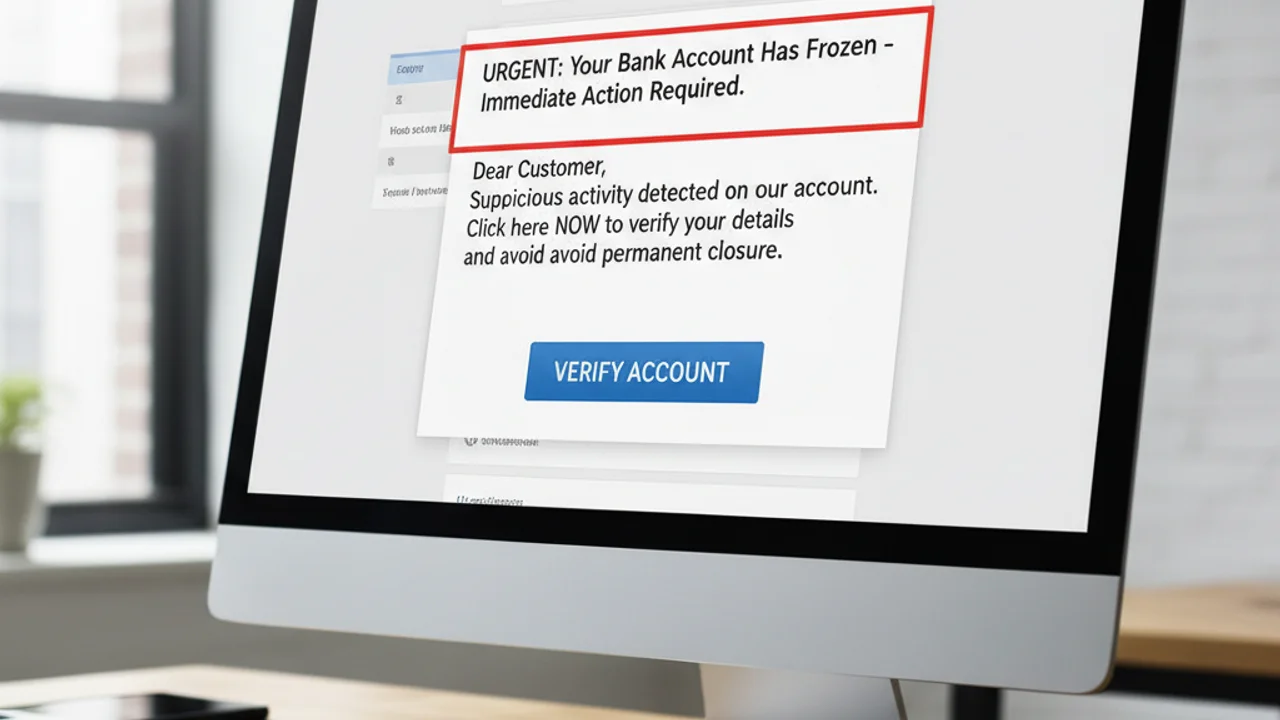
Phishing is not new. It has been a staple of cybercrime since the early days of the internet. But the phishing emails of 2026 bear almost no resemblance to the laughably obvious Nigerian prince scams of two decades ago. Today's phishing attacks are crafted with AI precision, personalized with data harvested from social media and data breaches, and designed to exploit psychological triggers that bypass rational judgment. They are, quite simply, harder to detect than they have ever been.
The numbers reflect this evolution. The Anti-Phishing Working Group recorded over 5 million phishing attacks in 2025, a record high. The average cost of a successful phishing attack on a business exceeded $4.9 million. For individuals, losses ranged from compromised credentials to drained bank accounts. Understanding how to detect phishing in its current form is no longer a nice-to-have skill, it is essential digital self-defense.
Phishing in 2026: A New Era of Email Fraud
Three developments have transformed phishing in the past two years. First, large language models have eliminated the grammatical errors, awkward phrasing, and cultural missteps that once made phishing emails easy to spot. AI-generated phishing content is grammatically perfect, tonally appropriate, and indistinguishable from legitimate business communication.
Second, the proliferation of data breaches has given phishing operators access to vast databases of personal information. They know your name, address, employer, recent purchases, and even the last four digits of your credit card. This data fuels highly personalized attacks that feel authentic because they reference real details about your life.
Third, phishing infrastructure has been democratized. Phishing-as-a-service platforms on the dark web allow anyone with a few hundred dollars to launch professional phishing campaigns complete with realistic landing pages, email templates, and credential harvesting tools. The barrier to entry has never been lower, and the tools have never been better.
How Modern Phishing Attacks Work
A modern phishing attack follows a structured process. The attacker first selects targets, either broadly or specifically. They construct an email that impersonates a trusted entity, a bank, employer, government agency, or service provider. The email contains a call to action: click a link, download an attachment, or reply with information. The link leads to a fake website that mirrors the legitimate site's appearance, designed to capture login credentials, personal data, or financial information.
What distinguishes 2026-era phishing is the attention to detail. Phishing emails now include correct company logos and branding, matching color schemes and fonts, accurate footer information including real company addresses, properly formatted sender display names, and contextually appropriate content that references real events or services. Some even include working unsubscribe links that lead to the real company's email preference center, giving the message an additional layer of authenticity.
AI-Generated Phishing: The Game Changer
AI has fundamentally changed the economics and effectiveness of phishing. Previously, phishing campaigns required human copywriters who could produce convincing content in the target's language. This limited the scale and quality of attacks. AI tools now generate thousands of unique, contextually appropriate phishing emails in seconds, each varied enough to evade pattern-based email filters.
AI-powered phishing also enables real-time adaptation. Attackers can analyze which subject lines, sender names, and content formats generate the highest open and click rates, then automatically optimize future messages. This iterative refinement produces phishing emails that consistently outperform previous generations. The convergence of AI with email fraud shares parallels with how scammers use AI in other domains, including the AI voice cloning scams that target victims through phone calls.
Got a suspicious email with a link? Scan it with Truvizy before clicking to detect phishing indicators.
Spear Phishing: Targeted Attacks
While broad phishing campaigns cast a wide net, spear phishing targets specific individuals with researched, personalized content. A spear phishing email might reference a conference you recently attended, a project you mentioned on LinkedIn, or a purchase you made online. This personalization dramatically increases the success rate, some studies suggest spear phishing success rates exceed 30 percent, compared to under 3 percent for generic phishing.
High-value targets, executives, financial controllers, IT administrators, receive the most sophisticated spear phishing attacks. These emails may appear to come from a colleague, a vendor, or a board member, and the request may seem routine: approve a wire transfer, update account details, or review an attached document. The mundane nature of the request is precisely what makes it effective.
Business Email Compromise (BEC)
Business email compromise is the most financially devastating form of phishing, with the FBI reporting over $2.7 billion in BEC losses in 2025 alone. BEC attacks involve impersonating executives, vendors, or trusted business partners to authorize fraudulent wire transfers, redirect payments, or steal sensitive business data. These attacks specifically target employees who handle financial transactions and often bypass technical security measures by exploiting human trust and organizational hierarchy.
A typical BEC attack involves an email that appears to come from the CEO to the CFO, requesting an urgent wire transfer to a new account for a "confidential acquisition." The email may reference real business details to appear authentic. Because BEC emails rarely contain malicious links or attachments, they pass through most email security systems undetected. The social engineering aspect mirrors the trust manipulation used in social media impersonation scams .
Common Phishing Disguises and Templates
Phishing emails most commonly impersonate financial institutions with "suspicious activity" alerts, shipping companies with "delivery problem" notifications, email providers with "account verification" requests, government agencies with "tax refund" or "legal action" notices, subscription services with "payment failed" warnings, and HR departments with "policy update" or "benefits enrollment" messages. Each disguise exploits a specific psychological trigger: fear, urgency, curiosity, or the desire for financial gain.
Seasonal patterns also drive phishing themes. Tax season brings IRS impersonation emails. Holiday shopping seasons bring fake delivery notifications and retail promotions. New Year brings "account renewal" scams. Being aware of these cyclical patterns helps you maintain heightened vigilance during peak phishing periods.
Practical Detection Techniques
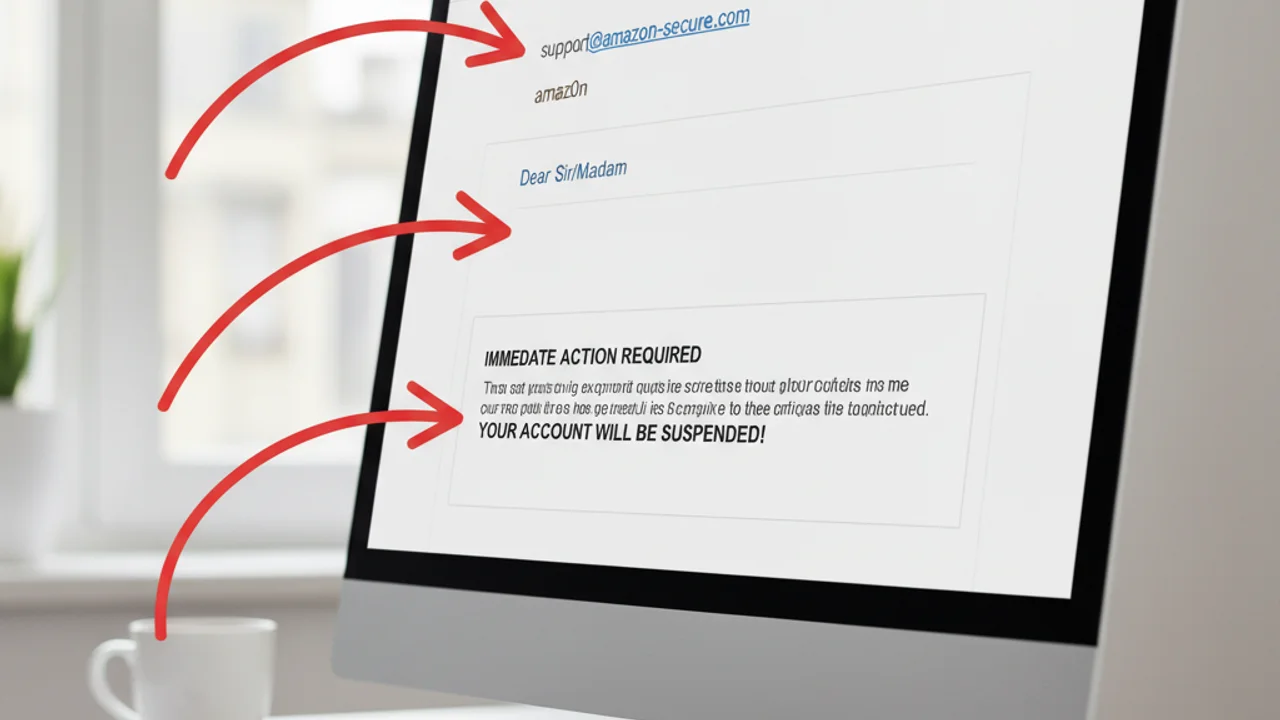
Despite the increasing sophistication of phishing, several detection techniques remain effective. Start with the sender address. Phishing emails often use addresses that look similar to legitimate ones but contain subtle differences: support@amaz0n.com instead of amazon.com, or alerts@bankofamerica-security.com instead of bankofamerica.com. Always check the actual email address, not just the display name.
Before clicking any link, hover your cursor over it to preview the URL destination. On mobile devices, press and hold the link to see the URL. If the destination does not match the organization the email claims to be from, it is phishing. Be wary of URL shorteners that mask the true destination. Check for HTTPS on any page where you are asked to enter information, though be aware that many phishing sites now use HTTPS as well.
Examine the emotional tone. Phishing emails nearly always create urgency: "Your account will be suspended in 24 hours," "Unauthorized access detected," "Respond immediately to avoid legal action." Legitimate organizations rarely communicate with this level of urgency through email. When you feel pressured to act quickly, pause, that pressure is the attack vector. Analyze suspicious content with AI-powered scanning tools for an additional layer of verification before taking any action.
You receive an email from 'support@amaz0n-security.com' saying your account is locked. What should you do?
- Click the link in the email to unlock your account quickly
- Reply to the email asking for more information
- Ignore the email and go directly to amazon.com to check your account
- Forward it to your friends to warn them
Answer: Never click links or reply to suspicious emails. Instead, navigate directly to the organization's website by typing the real URL into your browser. The sender address 'amaz0n-security.com' uses a zero instead of an 'o' and adds '-security', both classic phishing indicators.
What to Do If You Fall for a Phishing Email
If you realize you have entered credentials on a phishing site, change the compromised password immediately, and change it on any other account where you used the same password. Enable two-factor authentication on every account that supports it. If you entered financial information, contact your bank and credit card companies to freeze accounts and dispute any unauthorized transactions. If you downloaded an attachment, disconnect from the internet and run a comprehensive malware scan.
Report the phishing email to your email provider (most have a "Report phishing" button), to the organization being impersonated (most have a dedicated phishing reporting email), and to the Anti-Phishing Working Group at reportphishing@apwg.org. If you suffered financial loss, file reports with the FTC, FBI IC3, and your local police department.
Stay ahead of phishing attacks with AI-powered email and content analysis that catches what spam filters miss.
Tools and Prevention Strategies
Build a layered defense against phishing. Use a password manager that auto-fills credentials only on legitimate sites, it will not fill in your bank password on a phishing domain that merely looks like your bank's site. Enable two-factor authentication everywhere, preferably using hardware security keys or authenticator apps rather than SMS codes, which can be intercepted.
Keep your email client and operating system updated, as security patches frequently address phishing-related vulnerabilities. Consider advanced protection tools that use AI to analyze suspicious communications and identify phishing indicators that human eyes might miss. Train yourself and your family to treat every unexpected email with healthy skepticism, especially those that request action, contain links, or create a sense of urgency.
The most important defense against phishing remains the same as it has always been: when in doubt, do not click. Instead, navigate directly to the organization's website by typing the URL into your browser. Contact the organization through official channels to verify whether the communication is legitimate. A few extra seconds of verification can prevent months of recovery from identity theft or financial fraud. Understanding the broader landscape of digital threats, including tech support scams that often begin with phishing, will strengthen your overall digital resilience.
Key Takeaways
- AI-generated phishing has eliminated spelling errors and awkward phrasing, focus on sender addresses, link destinations, and emotional urgency instead.
- Always hover over links before clicking and check the actual sender email address, not just the display name.
- Use a password manager that only auto-fills on legitimate domains, and enable two-factor authentication on every account.
- When in doubt, never click. Navigate directly to the organization\
Related reading: Social Media Impersonation: How the same trust manipulation tactics power both phishing and social media fraud.
Related reading: Social Engineering Attacks: The psychological manipulation techniques that make phishing so effective.
Related reading: How to Report an Online Scam: Step-by-step guide to reporting phishing to platforms, the FTC, and law enforcement.
Frequently Asked Questions
What is phishing?
Phishing is a type of cyberattack where criminals send fraudulent communications, typically emails, designed to trick recipients into revealing sensitive information such as passwords, credit card numbers, or personal data. The communications impersonate trusted entities like banks, employers, or government agencies.
How can I tell if an email is a phishing attempt?
Key indicators include: sender email address that does not match the organization it claims to represent, generic greetings instead of your name, urgent or threatening language, requests for personal information, suspicious links (hover to check the URL before clicking), unexpected attachments, and offers that seem too good to be true.
What should I do if I clicked a phishing link?
Immediately disconnect from the internet, change passwords for any accounts you may have entered credentials for, enable two-factor authentication where possible, run a full malware scan on your device, monitor your bank accounts and credit reports for unauthorized activity, and report the phishing email to your email provider and the organization that was impersonated.
Can phishing emails bypass spam filters?
Yes. Sophisticated phishing emails can bypass spam filters by using legitimate email services, clean domains with no previous spam history, personalized content that avoids trigger words, and proper email authentication headers. AI-generated phishing is particularly effective at evading automated filters.
What is the difference between phishing and spear phishing?
Phishing is a broad attack sent to many people with generic content. Spear phishing targets specific individuals with personalized content based on research about the victim, such as their name, role, employer, recent purchases, or social media activity. Spear phishing is much harder to detect and has a significantly higher success rate.