QR Code Quishing Scam 2026: How a Fake QR Code Hijacks Your Payment in Seconds
Quishing hides phishing inside a QR code that skips your spam filter. Learn the 6 places fake QR codes hit in 2026 and how to verify a link before you scan.
TL;DR
A QR code quishing scam hides a phishing link inside a QR code so it slips past email and text spam filters, then sends you to a spoofed payment or login page. Fake QR stickers now cover parking meters, restaurant menus, and package "redelivery" texts, and QR phishing rose about fivefold in 2025. Preview the full URL before you scan, never enter card details from a code you did not expect, and scan a suspicious message or link with Truvizy first.
You pull into a parking spot, and the meter has a tidy QR code telling you to scan and pay by phone. You scan, a familiar-looking payment page opens, you type your card number, and you walk away. Two days later there are charges you never made. The code was a sticker, placed over the real one by a stranger, and you just handed your card to a QR code quishing scam. This is the fastest-growing trick in phishing right now: a malicious link folded inside a square of dots that your spam filter never even sees.
Quishing works because it moves the attack off the channels we have learned to distrust and onto the one device we trust most. Email gateways and text filters are trained to catch suspicious URLs, but a QR code is an image, so the dangerous address rides in unread. In one 2025 stretch, QR-based phishing emails surged from about 47,000 in August to over 249,000 in November, and early-2025 analysis identified more than 4.2 million QR phishing threats. Both the FBI and the FTC have issued consumer alerts warning against scanning unverified QR codes in texts, emails, and public spaces.
Quick Answer
What Is a Quishing Scam? (And Why a QR Code Beats a Spam Filter)
A quishing scam, short for QR-code phishing, delivers a phishing attack through a scannable code instead of a written link. The criminal encodes a malicious web address as a QR image and puts it somewhere you are likely to scan it: a printed sticker, a text message, an email, a flyer, or a fake invoice. When your camera reads the code, your phone offers to open the address, which loads a page built to look like a bank, a parcel service, a toll authority, or a login screen. Everything after the scan is ordinary phishing. The QR code is just the wrapper.
That wrapper is the whole advantage. Security tools that protect your inbox and messages scan text for known-bad and suspicious URLs, but they cannot read what is inside an image without extra effort, so a link hidden in a QR code frequently sails straight through. The scan also jumps you from a monitored work computer to a personal phone, which usually has weaker filtering and a small screen that hides the real destination. For a full walkthrough of vetting any address, our guide on whether a website is legit pairs well with everything here.
The 6 Places Fake QR Codes Are Hitting People in 2026
Quishing shows up wherever a QR code already feels normal. According to FBI and FTC advisories, these are the six settings driving the most reports in 2026:
- <strong>Parking meters and pay stations.</strong> Scammers stick a fake code over the real one so your payment, and your card details, go to them.
- <strong>Restaurant and bar menus.</strong> A tampered table sticker sends you to a lookalike menu or "pay your tab" page that harvests your card.
- <strong>Package "redelivery" texts.</strong> A message claims a parcel is held and a QR code will reschedule it for a small fee. The fee page steals the card.
- <strong>Unpaid toll notices.</strong> A text or letter warns of an overdue toll and provides a QR code to settle it, mimicking real toll agencies.
- <strong>Invoices and e-transfer requests.</strong> A fake invoice or payment request carries a QR code that routes your money and login to the attacker.
- <strong>Event tickets and flyers.</strong> A poster or resold ticket uses a QR code that leads to a credential-harvesting or fake-checkout page.
The physical-sticker version is especially costly. In one 2025 case, fake QR stickers placed over legitimate codes at roughly 200 store locations caused a 15% drop in genuine scans and about $2.3 million in damage-control costs. A sticker costs pennies, and it turns a trusted surface into a payment trap.
How the QR Sticker Swap and the Text-Based Quish Actually Work
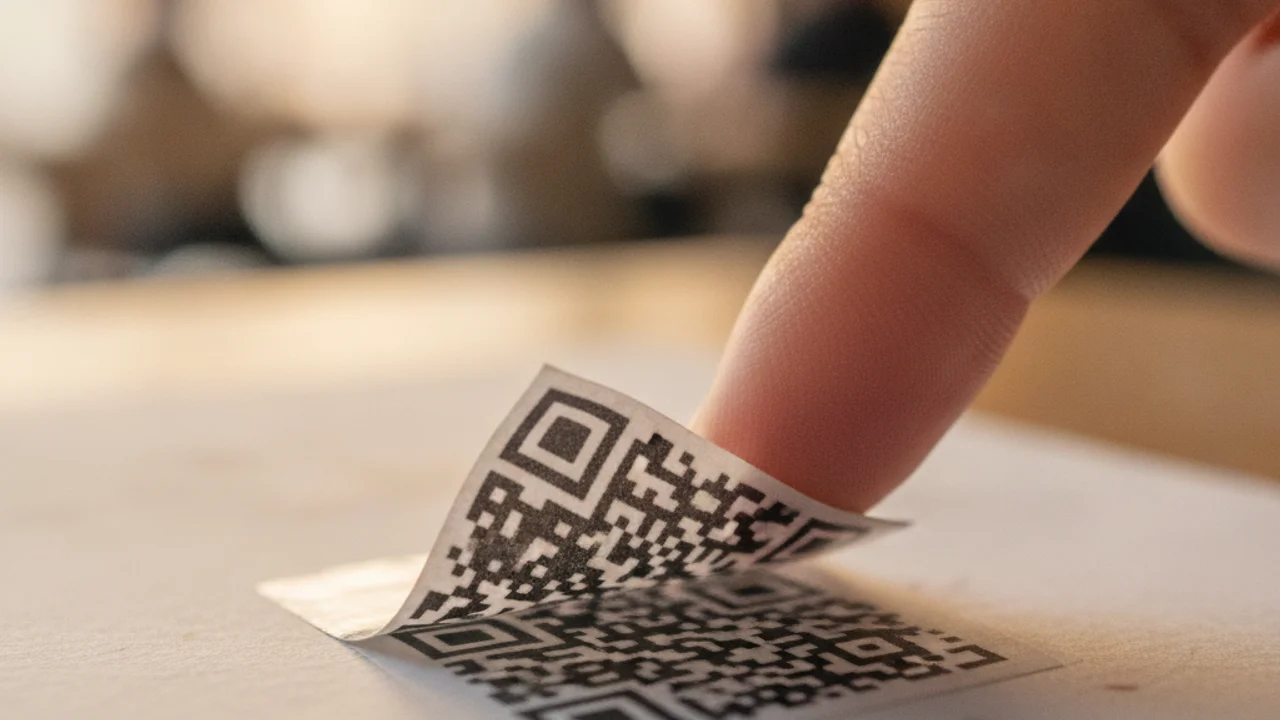
There are two dominant methods, and knowing both is how you stay ahead of them. The first is the sticker swap. An attacker prints a QR code that points to a domain they control, often a near-perfect copy of a real payment page, then physically covers the legitimate code on a meter, menu, or poster. Because the surrounding sign is real, your guard stays down. You scan, the spoofed page loads, and you enter card or account details that flow straight to the criminal.
The second is the text-based quish, a cousin of classic smishing text scams. Here the QR code arrives in a message or email, wrapped in urgency: a package cannot be delivered, a toll is overdue, an account needs verifying. The QR image dodges the URL filters that would flag a plain link, and the small phone screen hides the ugly, misspelled domain the code actually points to.
Red Flags: How to Spot a Fake QR Code Before You Scan
Any one of these is a reason to stop. Two or more together means you are almost certainly looking at a QR code quishing scam.
- <strong>A sticker over a sticker.</strong> Peeling edges, a code that sits crooked, or a QR label that does not match the sign it is on.
- <strong>An unexpected payment or login demand.</strong> A prize, a parcel fee, or a toll you were not already expecting to pay.
- <strong>A mismatched preview URL.</strong> After scanning, the address is a shortened link, a misspelled brand, or a domain that has nothing to do with the venue or company.
- <strong>Urgency and threats.</strong> "Final notice," "account will be closed," or a countdown pushing you to pay right now.
- <strong>A code sent by text, DM, or email.</strong> Real carriers and toll agencies do not usually text you a QR code to collect money.
- <strong>A request for a one-time passcode.</strong> No legitimate payment page asks you to read back a code your bank just texted you.
Got a QR code or link in a text that feels off? Scan it on Truvizy before you tap or pay.
How Truvizy Detects QR Code Quishing Scams
The dangerous moment in quishing is the second between scanning a code and typing your card in, and that is exactly where Truvizy is built to help. When a QR code sends you to a suspicious page, or when a text arrives carrying a code and a story about a parcel or a toll, you can pass the message or link to Truvizy's AI-powered detection instead of trusting it blindly. Truvizy's multi-layer analysis weighs the destination and the message against known scam patterns, so you get a clear verdict before any details leave your phone.
That early check is the entire point. A quishing page is designed to look identical to the real thing, and the small screen hides the tells that would give it away on a desktop. Submit the suspicious message or link at truvizy.app, and Truvizy tells you whether you are being funneled toward a fake payment or login page while you can still walk away clean. In a year when QR phishing is one of the fastest-growing threats online, verifying before you scan is the difference between a shrug and a stolen card.
What to Do If You Scanned a Fake QR Code
If you only scanned the code and closed the page without entering anything, you are almost certainly fine. Delete the message and move on. If you entered details, move fast and do not blame yourself, because these scams are engineered to beat careful people.
Call your bank or card issuer immediately. Report the transaction as fraud, dispute any charge including small "fees," and request a new card number to shut down further billing. Federal chargeback rights are your strongest protection on a credit card.
Lock down any account you logged into. Change the password on the real site, turn on two-factor authentication, and never approve a login prompt or read back a one-time code to anyone who calls you afterward claiming to help.
Report it. File with the FTC at reportfraud.ftc.gov and the FBI Internet Crime Complaint Center at ic3.gov, which feed the databases investigators use. If a fake sticker was on a public meter or menu, tell the business so they can remove it and protect the next person.
Key Takeaways
- Quishing hides a phishing link inside a QR code so it slips past email and text spam filters, then loads a spoofed payment or login page.
- Fake QR codes concentrate on parking meters, menus, package redelivery texts, toll notices, invoices, and event tickets in 2026.
- Preview the full URL before it loads, distrust any QR code that demands an unexpected payment or login, and never read back a one-time passcode.
- Scan a suspicious code or message with Truvizy before entering anything, and if you already paid, dispute the charge and report to the FTC and FBI fast.
Expert analysis note: Quishing has moved from a niche trick to a mainstream fraud channel because it exploits a gap that email and text filters were never designed to close, a malicious address concealed inside an image. Its explosive 2025 growth, roughly fivefold, tracks the shift of everyday payments onto mobile phones, where small screens hide the destination and trust runs high. Truvizy's role is preventive: verify the code or message before you scan and pay, because once a card number is typed into a spoofed page, the loss is usually already done.
You get a text saying a package could not be delivered and you must scan a QR code to pay a $1.99 redelivery fee today. What is the safest move?
- Scan the code and pay the $1.99 quickly so the parcel is not returned
- Scan the code just to see the page, then decide
- Do not scan it, and check the parcel directly in the carrier’s official app or website
- Reply STOP to the text and wait for the package
Answer: Real carriers do not text a QR code demanding a small fee to release a parcel. The urgency and the QR code together are the scam. Do not scan it. Go straight to the carrier's official app or website, and if unsure, scan the message on Truvizy first.
Frequently Asked Questions
What is quishing and how is it different from regular phishing?
Quishing is phishing delivered through a QR code instead of a clickable link. Because the malicious address is encoded as an image, it slips past the spam and link filters that scan email and text for known bad URLs. When you scan the code, your phone opens a spoofed payment or login page. The goal is the same as phishing, but the QR image is the disguise that gets it in front of you.
Can scanning a QR code actually steal my information?
Scanning alone usually just opens a web page, but that page is the trap. A quishing page mimics a real bank, toll, or parcel site and asks for your card number, login, or a one-time code. The moment you type those details in, the criminals capture them. According to the FTC, scammers hide harmful links in QR codes precisely to send you to sites built to steal your information.
How do I know if a QR code on a parking meter or menu is fake?
Look for a sticker placed over the original code, peeling edges, or a code that does not match the venue branding. After scanning, check the preview URL before it loads: a legitimate parking or menu link uses the official domain, not a shortened or misspelled one. If the page immediately demands payment or a login you did not expect, close it. When unsure, pay at the machine or ask staff for the real link.
Is that "package redelivery" or "unpaid toll" QR text a scam?
Almost always, yes. Legitimate carriers and toll agencies do not text a QR code demanding a small fee to release a parcel or clear a charge. These messages exploit urgency to rush you into scanning and paying. The FBI has warned repeatedly about QR codes in unexpected texts. Do not scan it. Go directly to the carrier or toll authority through its official app or website to check.
What should I do if I already entered my details after scanning a QR code?
Act fast. Call your bank or card issuer, report the transaction as fraud, dispute any charge, and request a new card number. Change the password for any account you logged into on the fake page and turn on two-factor authentication. Watch for follow-on scam calls or messages, and report the fraud to the FTC at reportfraud.ftc.gov and the FBI at ic3.gov.
Related reading: QR Code Scams: How Scanning Can Drain Your Bank Account — The broader landscape of QR code fraud and how to protect yourself
Related reading: Smishing Text Scams: How to Spot a Fake Text Message — Why scam texts work and the red flags in every suspicious SMS
Related reading: Is This Website Legit? 7 Free Ways to Check Any URL — Verify any link or destination before you enter your details
Frequently Asked Questions
What is quishing and how is it different from regular phishing?
Quishing is phishing delivered through a QR code instead of a clickable link. Because the malicious address is encoded as an image, it slips past the spam and link filters that scan email and text for known bad URLs. When you scan the code, your phone opens a spoofed payment or login page. The goal is the same as phishing, but the QR image is the disguise that gets it in front of you.
Can scanning a QR code actually steal my information?
Scanning alone usually just opens a web page, but that page is the trap. A quishing page mimics a real bank, toll, or parcel site and asks for your card number, login, or a one-time code. The moment you type those details in, the criminals capture them. According to the FTC, scammers hide harmful links in QR codes precisely to send you to sites built to steal your information.
How do I know if a QR code on a parking meter or menu is fake?
Look for a sticker placed over the original code, peeling edges, or a code that does not match the venue branding. After scanning, check the preview URL before it loads: a legitimate parking or menu link uses the official domain, not a shortened or misspelled one. If the page immediately demands payment or a login you did not expect, close it. When unsure, pay at the machine or ask staff for the real link.
Is that "package redelivery" or "unpaid toll" QR text a scam?
Almost always, yes. Legitimate carriers and toll agencies do not text a QR code demanding a small fee to release a parcel or clear a charge. These messages exploit urgency to rush you into scanning and paying. The FBI has warned repeatedly about QR codes in unexpected texts. Do not scan it. Go directly to the carrier or toll authority through its official app or website to check.
What should I do if I already entered my details after scanning a QR code?
Act fast. Call your bank or card issuer, report the transaction as fraud, dispute any charge, and request a new card number. Change the password for any account you logged into on the fake page and turn on two-factor authentication. Watch for follow-on scam calls or messages, and report the fraud to the FTC at reportfraud.ftc.gov and the FBI at ic3.gov.